Camera:Kodak DX6440 Location: The Getty Museum, Los Angeles, California Date: Aug 17, 2004 Aperture: f/4 ISO: 100 Shutter: 1/350 Galleries:Abstract, Architecture Date Uploaded: Aug 23, 2004
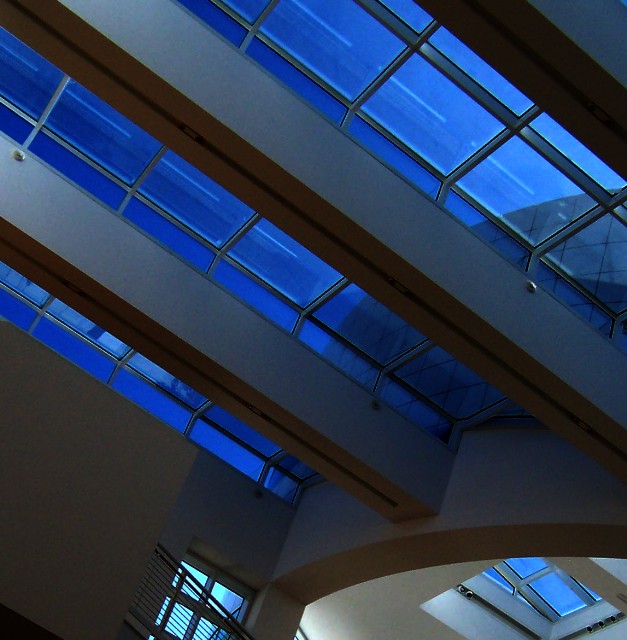
I have received so much great advice on how to help this image. I have a long way to go in learning to edit well. This is my original editing attempt using simple levels and contrast, and adding just a tad to the tilt. In the future, I want to work further on this.
I don't mind darker images, and I do think you've found interesting geometry here. The colors enhance the geometry well. I might be tempted to crop the bottom off and focus our attention to the interesting diagonal lines and deep blues in the upper 3/4. Anyway, I really like this.
Before I start, just to warn you, One of my nick names is Choppin' RoB. OK...CHOP! lol! Anyway I agree with Jason about the bottom. Th broken blind just has to go. The round part on the right is nice but it does not work well, for me, with the rest of the shot...though it does provide a nice shape contrast to the strait lines and the light blue to the dark blue above. But it has to go as well...cropping is the easiest way to go here and you just need to crop up from the bottom back most of the two full rafters. There is still a nice curve on the top right fo contrast. Now the color blue that remains I like a bit but I agree it is rather dark. I only have PS elements and I do not know what software you use for editing. I would adjust the levels and I most always to this by reseting the black, gray and white points. Sometimes auto levels works well and usually hit to see if I like it and if not go it alone. PSP8, which I also have, has one step picture fix which I use if I cannot lighten a dark image to my liking. The noise should be done away with but lighten first to see how far you got to take it. Like your compoisiton with strong diagonals. Let see what happens with the changes you decide on. I like the Title...I just worked on it a bit and I post the link in a moment. See what you think. It's just an idea....going your own way is always best....here you go:
That's a really photogenic building you've found. I agree about the grain. I would guess by looking at it that you shot it at 400 ISO. If you have a tripod you don't have to use a higher ISO but you may have to manually override your camera. The composition is good on this but some of the bottom parts are distracting. I would considerer cropping off the top or eliminating some with photoshop. I think you could get an excellent print out of it with some creative post-processing
A little grainy and dark. What camera settings did you use? Did you bracket? I love the lines and angles though. A great setting that should bring you back again and again, looking for that "perfect light."




 Add photograph to your favorites
 Add photographer to your favorites

 Photographer found comment helpful.


