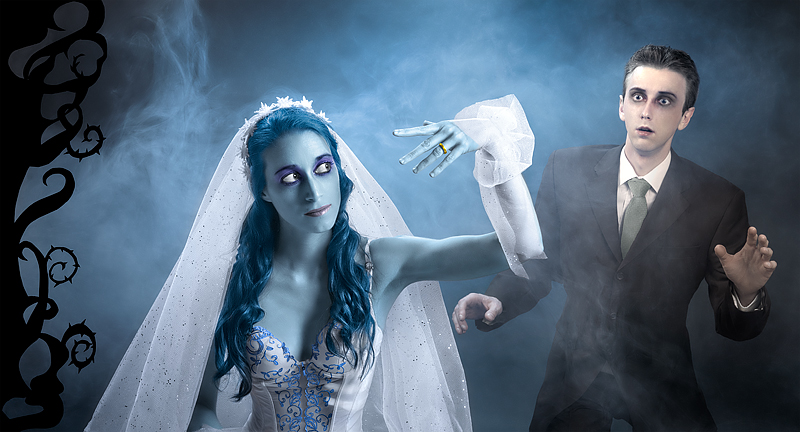
"Corpse Bride" being one of my wife's favorite movie, it was an obvious choice.
However, advanced editing rules were quite limiting considering Tim Burton's style, so we had to keep the setup relatively simple. Quite frustrating, I would have loved to create a much more elaborated picture for such challenge. Anyway, twisted branches to the left were cut out in cardboard and painted black, then attached to a plank. We also bought a small smoke machine, for added mood: it was hard to control precisely, but the result is no too bad I suppose.
It is also the very first project were we both appear at the same time, which was a challenge by itself: our work hours do not match very well, and we ended having only a couple of hours for the shooting session. My wife did not even see the finished picture before the deadline: since the colors were heavily adjusted in post-processing (especially skin), it was a little shock to discover herself in blue :)
Thank you for your generous votes and kind comments, we both are delighted.
Statistics
Place: 2 out of 34 Avg (all users): 7.9048 Avg (commenters): 9.0500 Avg (participants): 7.2105 Avg (non-participants): 8.0078 Views since voting: 8579 Views during voting: 640 Votes: 147 Comments: 52 Favorites: 9 (view)
Congratulations, Christophe. Wonderful image, which as always displays your creative skill, attention to detail and your dedication (buying a smoke machine).
Great work, you are really an inspiration with your continual excellence! As far as nightpixels' objection, I went back to look at the rules and here's what I found. Under the You May Not section it includes: "use distortions to create new effects or radically alter objects." So to me this means you can use distortions to alter objects in a subtle, non-radical way. Like nightpixels, I wasn't aware of that—good to know!
Thanks!
You might want to read this thread too, this is what convinced me it was legit. Good information.
Great work, you are really an inspiration with your continual excellence! As far as nightpixels' objection, I went back to look at the rules and here's what I found. Under the You May Not section it includes: "use distortions to create new effects or radically alter objects." So to me this means you can use distortions to alter objects in a subtle, non-radical way. Like nightpixels, I wasn't aware of that—good to know!
Yeah, I knew something was not right :) But is this legal in advanced editing? This almost falls into the expert editing territory. Maybe it is totally fine and I should go read the rules again. I though distortions were not allowed to a point where it changes the viewer's perspective on the image. Great final product regardless.
Distortions are allowed if they don't change the image too much. I don't think a bit longer fingers or bigger eyes change things radically. Moreover, the image is validated, so it looks like the council shares my opinion on this one :)
Congratulations! However with all due respect I completely disagree with the SC's decision on this. A little finger elongation, eyes enlargement, chin smaller, little here, little there, it does in fact change the image quite a bit. Of course, it is not my decision that matters, it is theirs and if they feel it is legit, then it is, however I don't. I think this is more like expert editing to me, just my opinion. Keep up the good work!
Yeah, I knew something was not right :) But is this legal in advanced editing? This almost falls into the expert editing territory. Maybe it is totally fine and I should go read the rules again. I though distortions were not allowed to a point where it changes the viewer's perspective on the image. Great final product regardless.
Distortions are allowed if they don't change the image too much. I don't think a bit longer fingers or bigger eyes change things radically. Moreover, the image is validated, so it looks like the council shares my opinion on this one :)
Congrats Christophe! Did you have to do anything to her ring finger and her eyes since they look a tiny bit liquified (ring finger's knuckle looks bigger than it should, and her eyes a bit bigger than they should). Picture is not large enough to tell for sure, but just the impression that I am getting from this 800-pixel long image.
Thank you Allen! Yes you are very close to the truth: I used liquify to make her fingers a bit longer, and eyes a bit bigger. Also, I made my chin thinner to get closer to the original characters appearance. You have good eyes :)
Yeah, I knew something was not right :) But is this legal in advanced editing? This almost falls into the expert editing territory. Maybe it is totally fine and I should go read the rules again. I though distortions were not allowed to a point where it changes the viewer's perspective on the image. Great final product regardless.
Congrats Christophe! Did you have to do anything to her ring finger and her eyes since they look a tiny bit liquified (ring finger's knuckle looks bigger than it should, and her eyes a bit bigger than they should). Picture is not large enough to tell for sure, but just the impression that I am getting from this 800-pixel long image.
Thank you Allen! Yes you are very close to the truth: I used liquify to make her fingers a bit longer, and eyes a bit bigger. Also, I made my chin thinner to get closer to the original characters appearance. You have good eyes :)
Congrats Christophe! Did you have to do anything to her ring finger and her eyes since they look a tiny bit liquified (ring finger's knuckle looks bigger than it should, and her eyes a bit bigger than they should). Picture is not large enough to tell for sure, but just the impression that I am getting from this 800-pixel long image.
Stunning work as always. Congrats on the red and as you already know, you two make a lovely couple!
ETA: Love the makeup and outfits on you, but your guyliner and dark hair really do help make you look a bit different. And wondering if that's a slip or similar piece of lingerie your wife's wearing?
The goal was to be as close as possible to the movie's aesthetic. The 1.85:1 ratio is another feature towards that goal.
And that is what I mean by your attention to detail. Most of us, myself included, probably didn't even notice that but the fact that you did it shows how much you think things through. Great work.
You look so young!!!! What a gorgeous wife! Congrats on the ribbon, Christophe. Thought this challenge was up your alley.
Thanks Johanna :-)
As for the young appearance, as you probably guessed, the skin was smoothed a lot to reach that "puppet" look. The goal was to be as close as possible to the movie's aesthetic. The 1.85:1 ratio is another feature towards that goal.
I don't know how you can be second... when I saw the images I immediately thought you were easily going to win. Congrats for you effort and wonderful score. ETA: where the hell did you find her dress?! :)
As I said before this was my favorite of the challenge. But it is a bit of fun to come out just ahead of you every once and awhile.:) congrats on the red.
I guess I might as well congratulate you on another blue now Christophe, lol! You look so trim there, are your wearing a girdle? And I have to say your wife looks as beautiful as always even with blue skin :)
She looks like Sarah Jessica Parker! Lovely tones. Wondering if you actually created smoke or used a brush or filter of some kind. Nice detail with the spiny vines on the left.
I knew you'd be the winner as soon as the challenge was announced. The subject is perfect for your talents and imagination - and you haven't let us down.
Simply excellent.
looks like a young gyabans as models? love the piping detail on her top and the skin tone. the thistles etc on the left dont do it for me they lack depth in an otherwise extremely 3d picture with plenty of depth they seem to flatten that side.





 You may kiss the Corpse Bride
 Add photograph to your favorites
 Add photographer to your favorites

 Photographer found comment helpful.


