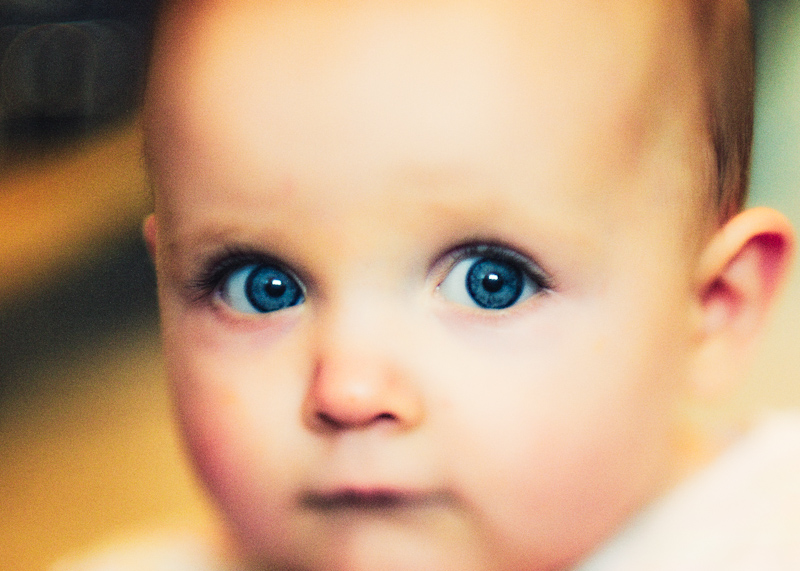
Taken with my Panasonic GF1 and new Lensbaby Tilt Transformer (thanks krnodil) with Nikon 85mm 1.8
After a DQ last entry (which was totally right-me just not thinking when submitting really- after sending off the file and thinking about it it was obvious where the DQ was) i'm being extra careful and i'm pretty sure this is ok for Basic even though the processing looks heavy.
Import RAW to Lightroom - Crop - Open in Photoshop
Nik Color Efex Pro- Settings to work only on background so as not to create new layer. No selections or vignettes used.
Tonal Contrast - Global adjustment.
Glow - Global adjustment.
Cross Balance- Tungsten to Daylight - Global adjustment.
Cross Processing-To1 - Global adjustment.
Curves - Colour sensitivity and saturation - Global adjustment.
Add grain - Global adjustment.
Unsharp Mask
Save to Lightroom
Curves and slight colour luminance and saturation adjust
Export as jpeg
Statistics
Place: 32 out of 65 Avg (all users): 5.5345 Avg (commenters): 7.5000 Avg (participants): 5.2333 Avg (non-participants): 5.5972 Views since voting: 1082 Views during voting: 308 Votes: 174 Comments: 9 Favorites: 2 (view)
something about the forehead region of this photo seems distracting,
My daughter has got a particularly large forehead. Like the Mekon. I guess the composition with the centrally placed eyes could also have something to do with it though.
The processing accentuates the subject's eyes beautifully. Some may critisize the graininess but I believe it adds to a well achieved piece of art work. Well done!
Nub of an ear on the left side of the image looks kind of like a wart... might have been better to not see it as all (per the portraiture rule of thumb) or to have been able to cleanly tell what it is. Image appears (on my laptop screen) to be slightly pixelated? Nice pose and concept.






 Add photograph to your favorites
 Add photographer to your favorites


 Photographer found comment helpful.


