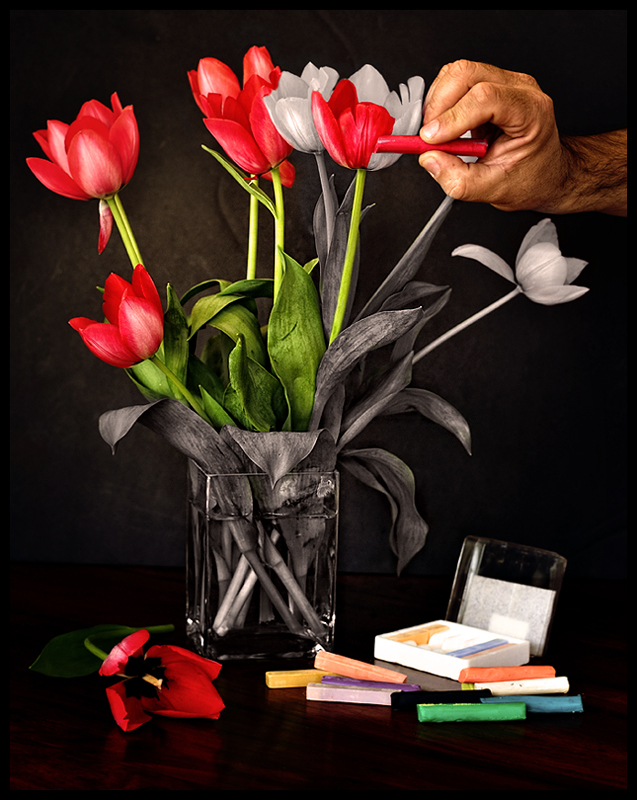
The Image: I know this kind of thing has been done before, but I thought I would do my take on this. The fact is that that the local shop had no chalk left, can you beloieve it? So, I had to be inventive and bought some modeling clay which looks like chalk. I also have some pastels there in the shot as well.
Used my well worn black board and natural light from the windows, set the self timer and did about a dozen shots till I was happy with this one.
The Edit: duplicate layer, multiply, lower opacity, mask layer to make a darker vignette. A HDR adjustment layer/mask. Converted a layer to B and W, maksed and carefully painted away. Some level, contrast, vibrance adjustments. A few other little tweaks and that's it. Took about 30 minutes to edit, 20 to shoot.
Prediction: I am going to have high hopes for this...high 6's
POST: Woo Hoo... a new picture on my profile page! Thank you everyone!!!!!
AFTER DQ: The breaking of the rules was based on the fact that I partially coloured in a petal and not all of it, which apparently means I created a new area. Extremely disappointed.
Disqualification Details
You may not use ANY editing tool to create new image area, objects or features (such as lens flare or motion) that didn't already exist in your original capture.
Statistics
Views since voting: 3157 Views during voting: 442 Comments: 74 Favorites: 17 (view)
More and more rules and limits will just discourage creativity and limit inspiration. The consequence is the overall number of visitors to dpc will be decreased, because the creative and interesting photos like this will be submitted to other community sites but dpc. Is that a good thing for dpc? 1X.com is selling prints and maybe, in the near future, betterphoto.com. How can dpcprints keep running?
so sorry enzo .. it can be difficult understanding the rules sometimes .. and then i imagine you get caught up processing and an action like all the rest is the one that gets you the dq .. colouring the petals but not the entire one .. i can understand the logic but what about when the colour changes gradually, like in the sky for instance .. ppl do it all the time ... a definite line or a gradual change .. both create something new ..
anyway its an awesome image dq or not .. and thankyou for the lesson in dq'able offenses .. :)
Very nice image, I think the desat was a perfect choice and very well done. As for the DQ, not as big fan of the rule or how it has been applied past or present. Congrats on a top image!
Regardless of the DQ, 44 8's, 28 7's, 9's, and 10's from dpc'ers says all that needs to be said about your image. Beautiful, creative, enjoyable, and I would even say, true art.
Well, it's one rule that I think is a bit over the top and should be addressed. I may be wrong, but I feel it was probably DQ'd because of the black border you added which is for the most part distinguishable around the actual image, but on the edge where your hand is and the border meets your black board it no longer looks like a border. At least it doesn't on my calibrated monitors. It has to clearly be defined as a border. If I add a border to my photos it's always a small black border, but I won't add it if there is a lot of black on any of the edges where it gets lost as it does here.
It's a pretty silly rule, and I agree with most if not all the rest, but to ME...if you can clearly see a black border (or sometimes white depending on the photo) on 3 of the edges it's pretty darn safe to assume that there is a border on the fourth side of the photo even if it blends in with the background. How many people add a border to only three sides of a photo. Answer...none. People either border two sides or the whole image.
I've seen it time and time again on here where a black border added to a black background gets a DQ. If you had added a white border for instance the photo would still have a blue ribbon next to it. Again, maybe there is some other reason that it was DQ'ed that I'm not seeing, but that's my take.
Great photo BTW...
Dave
It's not the black border Dave, it's that I partially coloured a petal in and not the whole petal...yes, you read that right
This is really sad, Enzo. I'm afraid, though, paulbtlw is right, it's the partially red petal where you created "a new image area". Absolutely minor in my eyes, doesn't add anything to the image - but rules are rules :(
This DQ is one that I've been caught out with before too. Once you get your head round it, it is perfectly fair. The new image area has been created between the selectively coloured areas in the area around the chalk. There is no 'natural' boundary to the area of coloration. If you had not strayed onto the petal nearest the chalk and had adjacent petals coloured differently rather than two colours on a single petal then this would have been OK because your differential coloration would have respected natural boundaries but because you created a new and arbitrary interface between the red and the white you have created a new image area.
(Ahh... Just spotted the whole thread on this, all been said already)
Well, it's one rule that I think is a bit over the top and should be addressed. I may be wrong, but I feel it was probably DQ'd because of the black border you added which is for the most part distinguishable around the actual image, but on the edge where your hand is and the border meets your black board it no longer looks like a border. At least it doesn't on my calibrated monitors. It has to clearly be defined as a border. If I add a border to my photos it's always a small black border, but I won't add it if there is a lot of black on any of the edges where it gets lost as it does here.
It's a pretty silly rule, and I agree with most if not all the rest, but to ME...if you can clearly see a black border (or sometimes white depending on the photo) on 3 of the edges it's pretty darn safe to assume that there is a border on the fourth side of the photo even if it blends in with the background. How many people add a border to only three sides of a photo. Answer...none. People either border two sides or the whole image.
I've seen it time and time again on here where a black border added to a black background gets a DQ. If you had added a white border for instance the photo would still have a blue ribbon next to it. Again, maybe there is some other reason that it was DQ'ed that I'm not seeing, but that's my take.
Great photo BTW...
Dave
That's kinda ridiculous, if that's true he basically got DQ'ed over 1/3 of 1 side of the frame, not even one whole side. There's clearly a border on the right side of the image, it just blends in a bit in the middle. You should contest if that's the reason.
Well, it's one rule that I think is a bit over the top and should be addressed. I may be wrong, but I feel it was probably DQ'd because of the black border you added which is for the most part distinguishable around the actual image, but on the edge where your hand is and the border meets your black board it no longer looks like a border. At least it doesn't on my calibrated monitors. It has to clearly be defined as a border. If I add a border to my photos it's always a small black border, but I won't add it if there is a lot of black on any of the edges where it gets lost as it does here.
It's a pretty silly rule, and I agree with most if not all the rest, but to ME...if you can clearly see a black border (or sometimes white depending on the photo) on 3 of the edges it's pretty darn safe to assume that there is a border on the fourth side of the photo even if it blends in with the background. How many people add a border to only three sides of a photo. Answer...none. People either border two sides or the whole image.
I've seen it time and time again on here where a black border added to a black background gets a DQ. If you had added a white border for instance the photo would still have a blue ribbon next to it. Again, maybe there is some other reason that it was DQ'ed that I'm not seeing, but that's my take.
I am absolutely dumbfounded over this. I have been on this site for 4 years and this makes no sense to me at all. I am going to appeal this. I have not added anything or cloned anything or added any motion blur. All my adjustments were made legally. if I have missed a step, I need better explanations.
While this pushed me up and into my 1st ribbon, not exactly the way that I wanted it. Sorry about the DQ. Either way, this is a fantastic shot to add to a great portfolio.
Enzo, this is so creative, beautiful and well done. SO pleased for you that it won. Many, many congrats on the blue and your new profile page pic. ((Hugs)).
WOW look at that score .. its the best image and what a wonderful way of satisfying the challenge ..
many congrats enzo on such a fantastic piece of art, the blue and third place on your profile page .. :)
Congratulations on the fantastic score and blue! It's a beautiful image, looks very artistic overall. My favorite of the challenge, quite happy it won :-)
really good idea...IMO if you had made this look a little more like a painting or chalk drawing (Artistic Brushes???) it would have fit together better...In other words...to me the clarity of the picture fits better with brush painting vs a chalk smudge feel...hope that makes sense...hmmm And mind you I didn't give you a bad score at all...





 Add photograph to your favorites
 Add photographer to your favorites

 Photographer found comment helpful.


