| Author | Thread |
|
|
07/12/2010 01:11:34 AM |
|
I thought this was great but I agree with the comments. You should email me the original so I can look at it. Maybe I can help you with this compression thing. Otherwise - great capture! |
|
 Photographer found comment helpful. Photographer found comment helpful. |
Comments Made During the Challenge  |
|
|
07/11/2010 04:37:37 AM |
|
| Photographer found comment helpful. |
|
|
07/10/2010 11:19:57 PM |
|
a bit soft...what happened to your framing? 6 |
|
| Photographer found comment helpful. |
|
|
07/10/2010 08:50:16 PM |
|
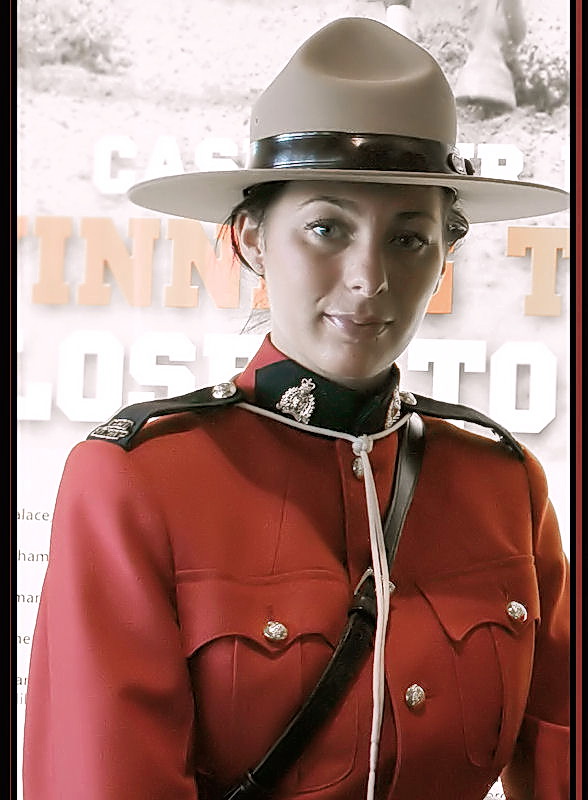
An interesting subject and an engaging pose. The quality is lacking though. The lighting is kind of flat, and it looks like you've overapplied noise reduction. |
|
| Photographer found comment helpful. |
|
|
07/07/2010 12:59:16 PM |
|
Too bad the one that gave me the $500.00 ticket didn't look like that. |
|
| Photographer found comment helpful. |
|
|
07/06/2010 08:49:49 PM |
|
agree, one of Canada's Finest ;) |
|
| Photographer found comment helpful. |
|
|
07/05/2010 09:32:44 AM |
|
their uniforms are the coolest - and she is quite a beautiful young woman. I just wonder about the light and focus |
|
| Photographer found comment helpful. |
|
|
07/05/2010 03:35:52 AM |
|
This is a really fine portrait that I like a lot, but your post processing lets it down a bit. Foremost, you've applied way too aggressive a compression resulting in artifacts throughout your subject. Advanced Editing rules allow for about 6 times the size of this photo. I'm not sure if that's also the reason for the porcelainish skin tones and lack of texture in her uniform, or because of too high an amount of noise reduction applied. Another couple of nit picks is her left elbow and brim of her hat are cut off, and the borders. One side has a big red stripe and the other has a thing brown stripe. I imagine that's just carelessness. All easy to go back and correct and you'll have something to be proud about. |
|
| Photographer found comment helpful. |
|
|
07/05/2010 12:32:25 AM |
Tons of blocky compression artifacts are showing. Your file size is a bit on the small side, but does not fully account for compression artifacts this heavy. I wonder if you repeatedly opened and saved as a JPG a few times. That could induce the excessive compression artifacts. Always save in an uncompressed format, such as TIF, PSD, or PSPIMAGE until the final resize and save as JPG. Always adjust JPEG compression so that your file size is as large as possible, but within the challenge limit.
Overall, the image looks a bit flat as well, with blown highlights in the background. And the subject is not framed well, being cut off at the frame edge.
Sorry to be so harsh on it this early in voting, but I feel I should at least explain a low vote if I can identify the reasons for it. |
|
| Photographer found comment helpful. |
|
|
07/05/2010 12:31:02 AM |
|
The model is nice, but the image resolution looks poor. |
|
| Photographer found comment helpful. |
Theme:
Classic /
Light /
Dark
Home -
Challenges -
Community -
League -
Photos -
Cameras -
Lenses -
Learn -
Help -
Terms of Use -
Privacy -
Top ^
DPChallenge, and website content and design, Copyright © 2001-2026 Challenging Technologies, LLC.
All digital photo copyrights belong to the photographers and may not be used without permission.
Current Server Time: 10/16/2026 11:52:19 AM EDT.






 Add photograph to your favorites
 Add photographer to your favorites


