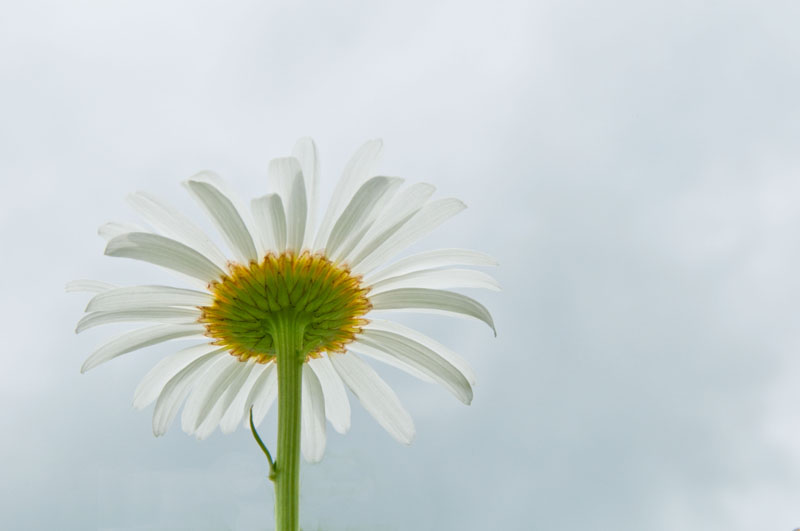
Purpose of photo: try to do something different
Lighting: cloudy day
Set up: Laying on my back in a weed patch shooting up
Editing Steps: in raw, adjust exposure, fill light, clarity. In PS cloned out a little green thingy by the flower stem, Doged, might have burned slightly under the petals. I'm an old Correl User, and Thats about all I know how to do in PS.....
Statistics
Place: 129 out of 380 Avg (all users): 5.8106 Avg (commenters): 8.0000 Avg (participants): 5.7290 Avg (non-participants): 6.1600 Views since voting: 2461 Views during voting: 205 Votes: 132 Comments: 6 Favorites: 2 (view)
Thank you all for your votes and comments. Being NEW to not only DP Challange, my Nikon D90, and Photo shop, I appreciate every one! I'm an ol' Correl graphic designer for Bilboards, and OMG is there about a million things diff to learn again... ( hope you can teach an old dog new tricks!)
Simple, clear & direct, just what a daisy would approve of. The color of the sky is a delicate complement to the light/shadow on the daisy petals. Well done. Please accept my humble admiration & this Gilded Lily--
I like this but it lacks contrast with the sky. It does look like you used a light source under the daisy and that is good. Someone taught me a photoshop trick when I was editing my current free study entry...
...it was to create a layer and used "soft light" as the layer property. It really adds and makes the subject pop out from the background.
I'll go ahead and give this a 6. I base my score on the lighting used under the daisy and the fact that I can make out each petal against the sky background.






 Add photograph to your favorites
 Add photographer to your favorites

 Photographer found comment helpful.


