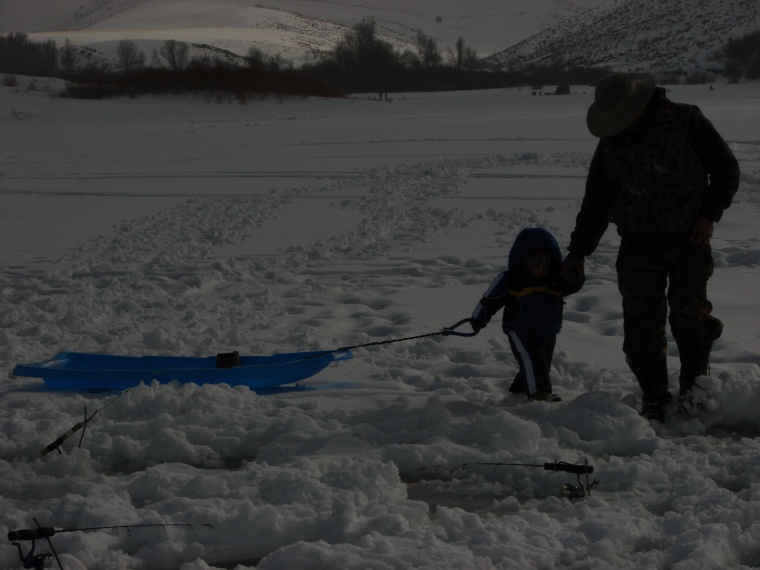
Ice fishing with my grandson.It was a cloudy day I went with a auto setup because this camera is new to me and Iam just learning my settings any imput is greatly appreciated thanks.
Statistics
Place: 78 out of 82 Avg (all users): 3.7877 Avg (commenters): 3.4286 Avg (participants): 3.6739 Avg (non-participants): 3.8193 Views since voting: 901 Views during voting: 322 Votes: 212 Comments: 12 Favorites: 0
As far as the exposure issue I believe the commenters covered that pretty well so I will go over the other technical aspects.
The composition on this is fine, I like how you didn’t center the main subject however there is a lot of open space and a lot going on that I feel takes away from the main subjects. I would suggest getting in close to the people and really filling most of the frame with them. This setup is great to use for story telling but between the landscape, fishing hole, rods and sled it is a bit much. Perhaps center on the 2 people just walking in the snow or the older person pulling the kid on the sled or even kneeling down together holding a fishing rod.
Challenge:
Meets the challenge well and will relate well with those with children/grandchildren.
Artistic/Emotion:
This had the potential for a great emotion shot but unfortunately fell flat.
Summary:
The biggest thing that hurt you was the exposure. This would have probably been a solid 5 if properly exposed. But you live and learn and now you can only go up (hopefully) Keep practicing and having fun and enter as much as you can and you will learn and grow. There are many great resources on the internet about exposure and learning to use a digital camera that are excellent. And if you ever have questions you can always stop by the forums and someone will likely be able to help you out.
What Waddy says is correct. Bright snow, water and sand can completely fool an auto exposure system, because it does not know that the scene really IS that bright and it is trying to make a normal exposure out of it.
There is no substitute for getting a shot right in the camera, but there ARE some things you can do in post processing to help save such an exposure. I took a screen grab of your entry and did a levels adjustment on it.
What this adjustment does is it allows you to tell it what the brightest and darkest levels are in the image and then stretches the dynamic range of the image to match. If you look at the left hand thumbnail in this levels dialog (Your original image), you can see that the histogram is totally flat on the right side, which is the lighter tones. I then set the highlights slider (the white diamond shape) to match up with the brightest point for which the histogram shows there is detail. You can see the expected result in the righthand thumbnail preview. I went and pasted the after histogram into this so that you can see what the histogram looks like after the adjustment. The dynamic range has now been expanded to fill the available range, which lightens up the image and making the details more visible.
I also applied a modest amount of tonemapping using PaintShop Pro's clarify adjustment in order to bring out a little more detail from the dark figures, and then sharpened the photo a bit.
The camera's automatic metering system is trying to create a neutral grey (18% luminosity) average brightness overall for the whole scene in the image, which is about what this image shows. Neutral grey is a pretty dark grey.
To get well exposed shots in snow or on the beach, you have to set the camera EV (exposure value) setting to +1 or +2. There may also be a "scene" setting for beach or snow shooting that you can use. Check in your camera manual.
Don't be afraid to experiment with the camera's settings. You can always go back to full automatic.
This image is exceptionally dark on my montior, which makes it hard to pick out all the details. In particular, the father and son in the image as extremely dark which doesn't help when they should be the subject





 Add photograph to your favorites
 Add photographer to your favorites


 Photographer found comment helpful.


