Process RAW file in ACR
Import to PSE6
Duplicate background layer - gaussian blur.
Levels layer - no adjustment.
Group duplicate layer with levels layer.
Paint layers level with black to reveal sharp area of background layer.
Lasso tool to select sharp area.
Hue/Sat to increase color saturation.
Resize
USM
Save for web.
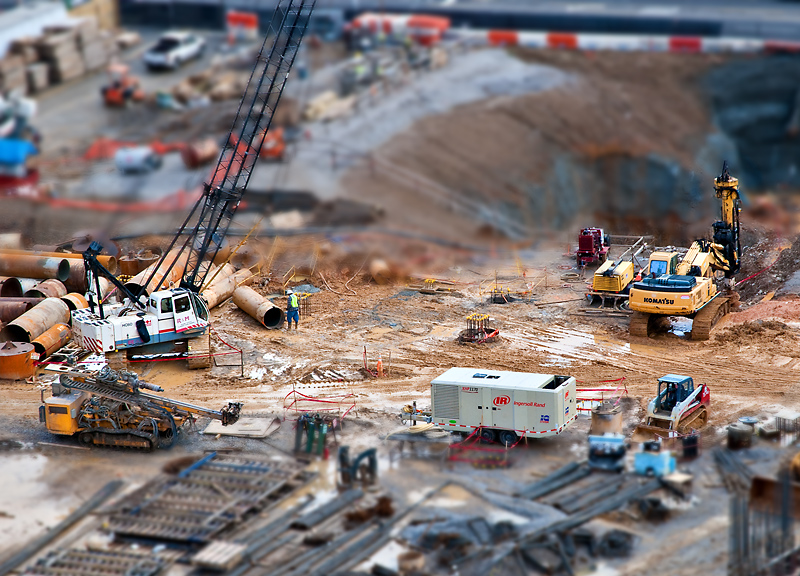
POST: WOW! A new PB! I really appreciate the great comments and votes. I walked the stairs to the 7th floor of a restricted parking deck across the street from this construction site to get this shot. Actually managed to be gone before the security guards caught up to me.
Statistics
Place: 1 out of 54 Avg (all users): 7.2883 Avg (commenters): 8.7500 Avg (participants): 7.2813 Avg (non-participants): 7.2901 Views since voting: 11144 Views during voting: 558 Votes: 163 Comments: 35 Favorites: 15 (view)
Wow... I never knew what tilt shift was when I viewed the challenge results. Saw your shot, thought it was an awesome miniature. Then I read the description of the challenge and realised that in fact it was not a miniature at all. I was simply blown away . Great job!
I really appreciate all of the comments. I also appreciate everyone's accepting that this image was created with photoshop, and not with a tilt-shift lens. I have not invested in a lens baby system yet.
bmatt17 - I can see your point about the mud, but I did not really think about trying to mute it. In my experience in construction, the work sites are typically muddy this time of year so to me it added a touch of realism to the miniature looking scene. But your way may have looked better if I had tried it. :)
glad2badad - I started to sharpen the crane supporting cables as you suggest, but it quickly became too painstaking of a job, plus it was looking like crap. For some reason the cables were blurry and not well defined. It was extremely windy on the day of the shot, so I don't know if that had anything to do with it. Getting straight lines defined for the cables was about impossible for me using a mouse, so I elected just to leave them blurred and hope that I wouldn't be penalized for it. I agree that it would have been more realistic to have them.
Again, thanks to all for the great comments and fantastic score!
Congrats on your ribbon. I voted you a bit below the curve. I gave you a 5 and thought I'd let you know why. You did a really good job getting the miniature feel to your photo but one thing bothered me and that is the mud. To me it's just too bright and wet looking and so it stands out. I'm curious what this would look like with the browns desat or somehow processed so that it looks like dirt instead of mud.
First off, congrats on the ribbon - that's WAY cool. I am surprised a little about one thing that nobody commented on. I should have, since it jumped out at me...related to the following post made during the challenge.
Originally posted by JimiRose:
You've done a good job here with the planes of focus, keeping the crane arm in focus really adds to the realism.
On the crane arm, there are supporting cables that connect from the back of the crane to the top, and then cables coming down to the ground. Everything in the area of those cables, and even slightly behind, is in focus, yet the cables are blurred the same as the background. ???
I'm not faulting you, the photographer, for not doing the painstaking photoshop work to keep those cables visible (I can't say whether I would, or would not, have tried either); I'm just really surprised that it wasn't picked up on by people that left comments.
Crazy. Some things we (collective group at DPC) nitpik, and sometimes just blow right past it.
Anyway...again, congrats on your new PB, and congrats on not getting caught in that restricted area! :-)
Magnificent. This should ribbon IMHO. I love the composition and you've placed the TS effect in just the right place. Must have taken you hours to set up all the miniatures in the scene :):):)





 Construction Zone
 Add photograph to your favorites
 Add photographer to your favorites

 Photographer found comment helpful.


