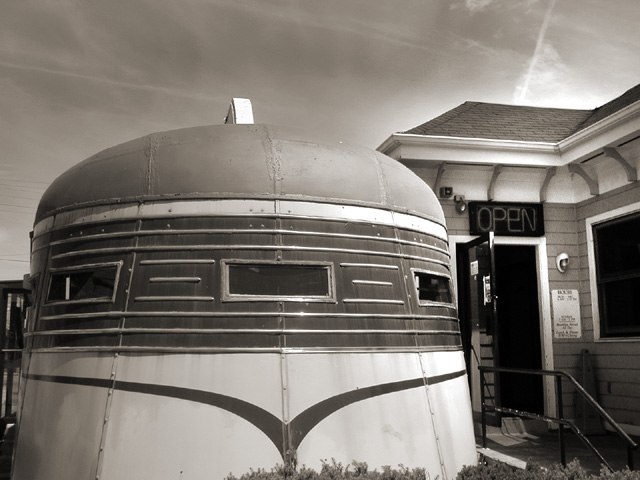
My daughter asked if in this challenge a train turned into a diner would count. I'm not sure but I thought it was a brilliant idea. We were out yard saling and right near The Modern Diner, one of the oldest diner's in the country and I took some shots. I liked this one the best. I dodged/burned and adjusted hue/saturation levels.
Statistics
Place: 110 out of 159 Avg (all users): 4.9593 Avg (commenters): 5.7500 Avg (participants): 4.6000 Avg (non-participants): 5.4026 Views since voting: 1200 Votes: 172 Comments: 8 Favorites: 0
Just a friendly suggestion...forget about the hue/saturation....use LEVELS to really get control over your contrast. Try making a LEVELS adjustment layer. Also to easliy and precisely correct color in your images you need to use the CURVES dialog. Set your RGB values to 10, 133 and 245 respectively (black, grey and white) then use the eye dropper and sample those colors in your image and the color will correct itself. Finally use the UNSHARP MASK with your image at full size... set pixels to 1.5, threshold to 4 levels and anywhere from 80 to 130 percent should do the trick and add some clarity to your shots.
Thanks for the very good advice. I actually started using the Levels recently after stumbling across some advice in a book. I hardly ever use the brightness/contrast adjustments and now I only use Levels to achieve satisfactory black and white images.
I will try the other things you suggested in the future. I've never used unsharp mask because, frankly, I haven't a clue how. :-D One of these days I'll get me a good PS book!
For now I have some guidelines which I'm going to copy and past for my files. Thanks a bunch!
Just a friendly suggestion...forget about the hue/saturation....use LEVELS to really get control over your contrast. Try making a LEVELS adjustment layer. Also to easliy and precisely correct color in your images you need to use the CURVES dialog. Set your RGB values to 10, 133 and 245 respectively (black, grey and white) then use the eye dropper and sample those colors in your image and the color will correct itself. Finally use the UNSHARP MASK with your image at full size... set pixels to 1.5, threshold to 4 levels and anywhere from 80 to 130 percent should do the trick and add some clarity to your shots.
It looks to me like this might be a train car, but the composition doesn't work well imho. My eyes are drawn to the building with the "open" sign, but that is clearly not the selling point of this image. I think a different angle on the diner (to the left, showing about the same amount of train car (if thats what it in fact is) and less of the building structure might work.





 Add photograph to your favorites
 Add photographer to your favorites


 Photographer found comment helpful.


