Open
Crop
select background
new layer via copy
select background in new layer
blur - average
change to 'screen' mode @ 60(ish)%
flatten
sharpen via Neat image
select lower pencils (not leads)
sharpen pencils via Neat image
select all
apply border via 'stroke'
USM
save for web
Statistics
Place: 78 out of 86 Avg (all users): 4.6886 Avg (commenters): 4.5000 Avg (participants): 4.3409 Avg (non-participants): 4.8130 Views since voting: 709 Views during voting: 298 Votes: 167 Comments: 7 Favorites: 0
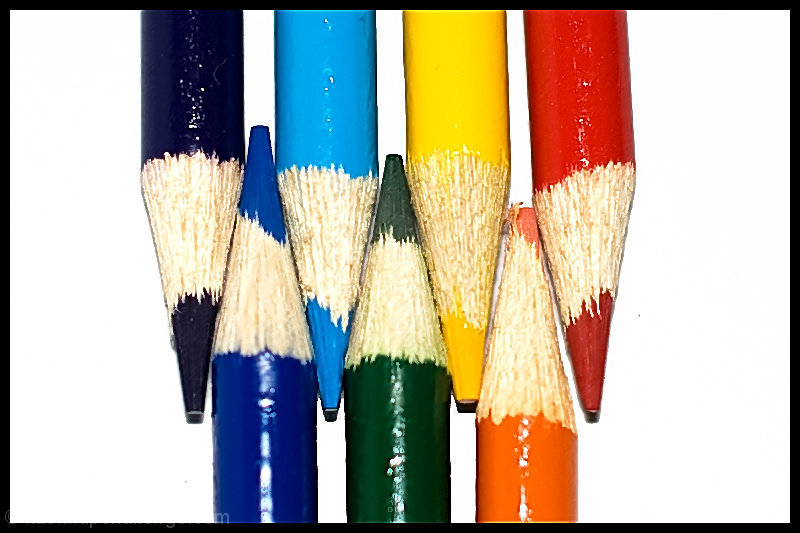
It's good to try our hand at things, even if they've been done before, but the colored pencils have become such a cliché. I think this image also suffers from too harsh lighting (flash?).
A bit overbright, yes, and sort of "mushy", though I'm sure that isn't a true technical term. It looks as though the focus isn't quite where you wanted it then it was oversharpened, perhaps? Not sure. I think had you shot with a long exposure and a very small aperture (f/11 or so, maybe?) and from a bit away to keep more of your subjects in focus, it would alleviate the "mushy". I think the concept is very good, colors are good. Probably could have sharpened the point on the orange pencil a bit better for the nit-pickers. Also, diffuse the light a bit more to prevent the glare and strong shadow. One way I try to do that is to put a white posterboard or paper to the side and shine the light on that rather than the subject, then deflect the light onto the subject. Another option is to get everything set up (camera focused and all), then "light" the scene with a flashlight/torch by waving it over and around the subject, thereby lighting everything pretty evenly. Does take a bit of trial and error to get the exposure right.





 Add photograph to your favorites
 Add photographer to your favorites


 Photographer found comment helpful.


