I thought I would do something a little different..all in Basic Editing.
Processing:
Open Image in PS / Crop
Set the curve point to lighten the background
USM to taste, approx. 66/100/4
Resized to Challenge specs 640x458 9approx)
Sharpened MORE, adjust to taste
Desaturated
NI
Sharpen
USM again 25/100/4
NI
Cropped a little off to clean up image..(random dots)
Resized again to tighten image...
Bordered... 2 px gray
Simple side by side 100x50 px white
10 px gray to finish..
Saved for Web.. approx 148 kb at 94 or so...
Submitted.
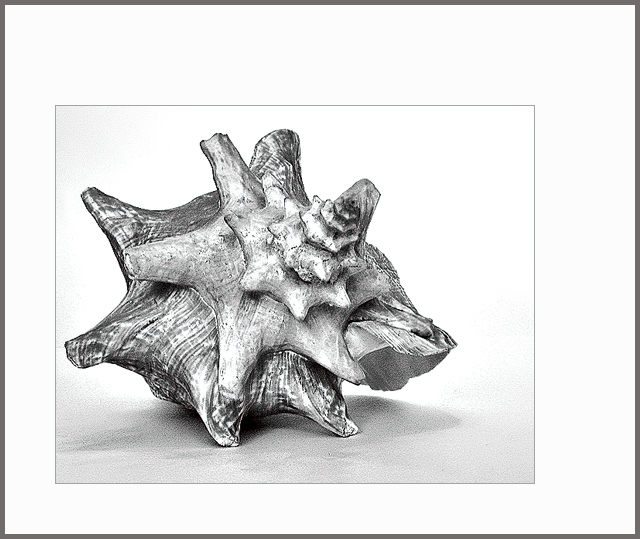
Looks like a pencil drawing... I really liked how it turned out...all basic editing steps..as I said something different. and it was fun...
Statistics
Place: 48 out of 166 Avg (all users): 5.7198 Avg (commenters): 6.0909 Avg (participants): 5.3333 Avg (non-participants): 5.8828 Views since voting: 1015 Views during voting: 331 Votes: 182 Comments: 14 Favorites: 0
I like the photo a lot, but can't quite make sense of the off-center framing. I don't personally think it's necessary to have such a large area of white - the photo itself is well-composed to emphasize the fractal nature of the shell. Without the frame I would have rated it higher - 6.
When I first saw your image I thought of a framed sketch hanging in a bathroom. I like the image, wish it were a bit larger though and not so much frame around it.
Love teh graphical nature of this, excellent B&W conversion, what software you using, NIK......? Also I think you might have set a new trend with offset border, very cool. My 10






 Add photograph to your favorites
 Add photographer to your favorites

 Photographer found comment helpful.


