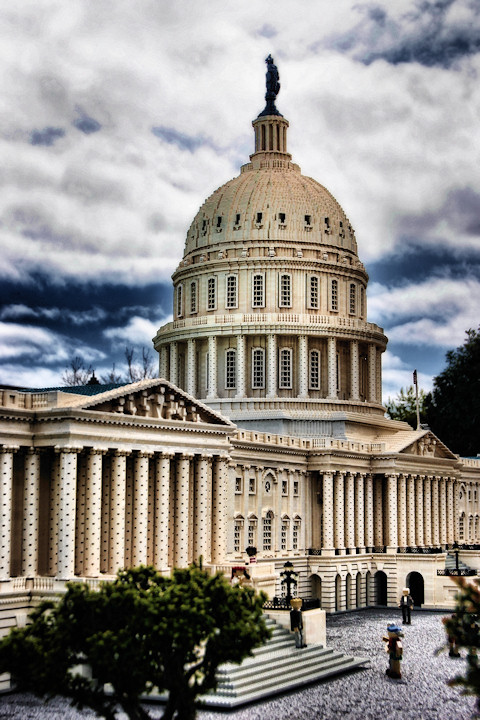
Yup, I went to Legoland (once) against my better judgement (no kids with us). I was plesantly suprised. A photog could spend a day in the miniture cities alone.
In Corel PSP X2 Ultimate:
Duped to new Layer.
Nik Viveza: Control points to darken and saturate sky and some parts of building.
Nik Color Efex Pro 3 (complete): Pro Contrast.
Topaz Adjust 3: Detailed
PSP: Adjust > Brightness and Contrast > Clarify (3)
Duped to new Layer.
Topaz Adjust 3: Vibrance to the Duped Layer > Blend Mode soft light, Opacity 55%
Merged down.
PSP: Adjust > Brightness and Contrast > Clarify (3)
So much contrast adjusting going on, that I had a slight Halo around figure on top of building. Light cloning to calm that down.
Wow, impressive! Great use for this sort of processing. Just two observations on the negative side. Some detail seems to have been lost in the thing on top of the dome, and the pretty blue color of the roof was lost. The people seem to blend into the background, but since they aren't important, that's no big deal.
I didn't realize these were legos from the thumbnail. Really detailed and the PP really made it pop. I noticed that, like myself, you are still using some clarify on top of Topaz. The effect is similar, but clarify still seems to do something a little different.






 Add photograph to your favorites
 Add photographer to your favorites

 Photographer found comment helpful.


