ok...really curious how you got the "red" leaves...wonderful...
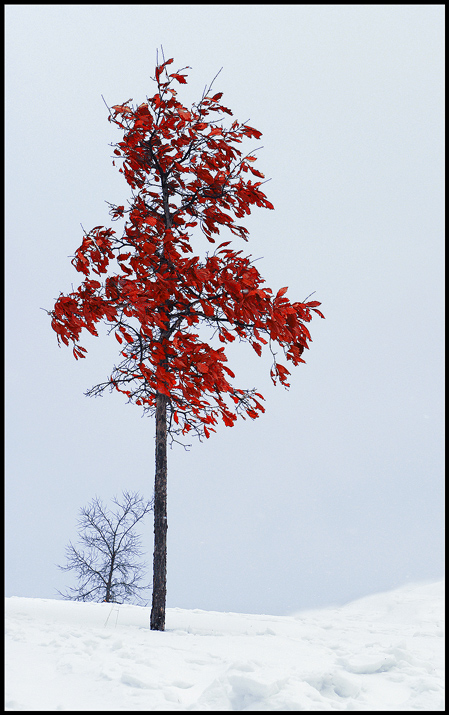
I'm a relative beginner with Photoshop. So I applied adjustment layers - selective color and hue/saturation. In fact not much remedy was necessary, as the leaves started out quite red.
While oak trees tend to drop their leaves in the spring, this specimen held on to 95% of its leaves until now, and they always were quite red.
Must be nice to see the red popping out of the cold and dreary winter scene. Did you do some kind of cloning on the right hill? It seems a little smudged, but I guess that could be windblown snow too. :)
We were in the middle of one more artic cold front when I took the photo. I scaled the snow/ice ridge left by the snow plow and managed to take two exposures before my hands froze up. On the right side of the picture there is a park walkway which meanders along. In order to not include it in the photo, I kneeled in the snow. Then, however, I was closer to the surface of the snow which was blowing along in a fine cloud. I think that is what you are seeing.
Thank you for your votes and comments. This is my personal best!
This young oak tree lives along my puppy's and my walking path. It has been very tenacious in holding on to its leaves which turned a bright red in the fall. I was suprised how little 'photoshopping' was required to restore nearly original fall color.
I considered cloning out the second ('companion') tree - which a number of you suggested - but the little red tree appeared lonely and I convinced myself (wrongly perhaps?) that the companion tree is consistent with the title.
Must be nice to see the red popping out of the cold and dreary winter scene. Did you do some kind of cloning on the right hill? It seems a little smudged, but I guess that could be windblown snow too. :)
Nice contrast of the red with the bright white snow. I'm not sure if the second tree in the background is part of what the title is referencing or not.





 Add photograph to your favorites
 Add photographer to your favorites


 Photographer found comment helpful.


