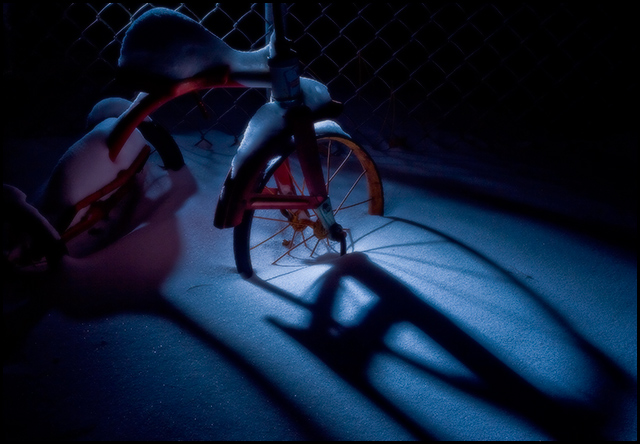
I was out for a walk early one morning and found this very old tricycle that someone was throwing away. It was so interesting and classic looking I had to take it home. I stuck it in my backyard for some future day when it might come in handy for a photo. Since then it has snowed several inches and the snow piled up on the trike. I was out with my daughter playing in the snow today and noticed it. I thought the spokes and the fence might make for interesting shadows. The only down side was that it was -9 degrees F, so I was only able to get about 3 shots off before my flash started misbehaving and my hands started to feel like someone was poking pins in them.
It was shot at night with a speedlight behind the trike with a home-made grid attachment to narrow the light beam. For post processing I wanted it to be sharp with sparkling snow but I also wanted a dreamlike quality. I achieved this through combining sharpening and a gaussian blur layer at 51% opacity.
Post Processing:
Camera Raw - exposure, blacks, white balance (shift to blue)
CS3 - sharpen, curves, gaussian blur layer at 51% opacity, add border, save for web
12/31/08 - post challenge (after red ribbon, before DQ)
Thanks so much to everyone for the comments and interest in this photo! I knew I liked the shot but always have a hard time predicting voter behavior... I was very surprised and pleased by the great response. I continue to learn so much from this site. Thanks to all who give their time and energy to make it what it is!
1/6/09 Post Disqualification
Hmmm... I have to say I'm both puzzled and disappointed by the site council's decision to DQ this image. Maybe someone can help me understand the rules better. How do I get more info?
There are two rules that seem related:
You may:
- Use filters or stand-alone utilities designed to preserve image integrity (such as Neat Image, Unsharp Mask, Dust & Scratches, and color correction tools). These filters must be applied uniformly to the entire image, and must not be used in such a way that their use becomes a feature. No “effects” filters may be applied to your image, with the exception of Noise and Gaussian Blur. -- I used Gaussian Blur only because this rule stated that I could
- Use only Adjustment Layers (or their equivalent). An Adjustment Layer is a special type of layer containing no image data that lets you experiment with color and tonal adjustments without permanently modifying the pixels. Adjustment Layers must be applied in Normal mode. -- I duplicated the background, used a Gaussian Blur on it and reduced opacity to 51%. If I can use Gaussian Blur, do I have to use it on the background layer?
Very confusing. It's a bummer to work so hard for something and get the rug pulled out by a very confusing rule. Any advice or clarification?
Disqualification Details
You may use only Adjustment Layers (or their equivalent). An Adjustment Layer is a special type of layer containing no image data that lets you experiment with color and tonal adjustments without permanently modifying the pixels. Adjustment Layers must be applied in Normal mode.
Statistics
Views since voting: 4337 Views during voting: 353 Comments: 39 Favorites: 10 (view)
> I duplicated the background, used a Gaussian Blur on it and reduced opacity to 51%. If I can use Gaussian Blur, do I have to use it on the background layer?
Yes, that is the issue. You can't duplicate the background layer in basic, you can only use layers with no image data, eg a curves or levels layer and only applied in normal mode. So you can only use Gaussian Blur on the background layer in basic (and therefore no option to change opacity). Hope that makes sense, if not pm me ....
Fine to duplicate background layers in advanced and do what you did or apply layers in duplicate or soft light mode etc.
Your efforts definitely paid off in spite of the bitter cold. It's amazing what we do to capture that perfect image. Congrats on your second place win!
I really like how this one turned out. The blue gives a nice cool feeling, with just a touch of red on the bike itself. And the shadows work really well with the rest of the picture.





 Add photograph to your favorites
 Add photographer to your favorites

 Photographer found comment helpful.


