I've received many harsh but well intentioned comments. This, however, is just rude and uncalled for. You would do well to simply ignore this member.
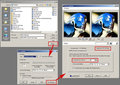
Anyway, since I left my comment, I posted an example of the JPEG file save dialog from Paintshop Pro. I don't know what you are using, but the settings may be similar.
Hope this helps. PM me if I can be of any other help on this.
Message edited by L2 - To remove quote of hidden comment.
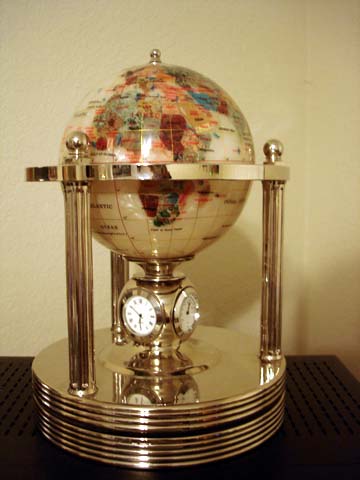
I like the concept, however I'm afraid the execution need some work. No doubt others will tell you the image should have used the full 640 pixels allowed on at least one side. White balance also seems to be a bit off and is giving a slight yellow cast to this image. Taking the WB adjustments a little cooler will help that.
The biggest problem, however, is that it seems blurred and unclear. I think most of it is due to the use of excessive JPEG compression. Your file size of only 27k indicates a highly compressed image and that is what is robbing most of the detail and sharpness from this image. Check your compression settings when you save your file. Always adjust JPEG compression so that your file size is as large as possible, but within the challenge limit. (150k for this one)
Sorry, I'm not getting the connection to the challenge theme. If you had shown me a more interesting perspective on the subject, I might have given it a point or two more.
Got the concept of the challenge and the clock/globe is really pretty. Seems a bit out of focus though and I'm sure that you're taking a bit of flack for the angle of the shot not being level as well as the drop of the edge of the table??? 6
ok im not sure i understand this really. i guess i do, but i dont feel the globe here is a good representative of the challenge. focus could use a bit of charleneing, lighting too





 Add photograph to your favorites
 Add photographer to your favorites



 Photographer found comment helpful.


