All those blocky artifacts that you can see around the edges of the subjects are the result of excessive JPEG compression.
Check your JPEG compression settings in your image editor. This is usually found somewhere within the file save dialog. If you are working on the shot in stages, save in an uncompressed format, such as TIFF, or at least a low compression JPEG. Always do your final save at the maximum file size you can get it to and still fit under the limit for the challenge.
ahh. well the first pictures usually go down in flames, but it seems you got lots of helpful comments to work with! good luck with your next photo! dont get discouraged!:)
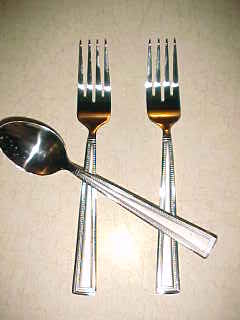
There is a lot of room for improvement here. It's too small for starters. The lighting is harsh, maybe just the on-camera flash. The picture is not very sharp and the background isn't interesting. Also it's a stretch for the challenge. Sorry I don't have any praise to offer here.
Meets challenge but photo is not appealing. You did not have enough lighting so the flash in your camera was used. You can see the were your flash in on the table and it gives a glare in you silverware.
good concept shot to show odd in more ways than one - but the extremely harsh lighting from the on camera flash, the too-small image and the cropping to not include the entire spoon costs this one points
Rather bizarre. Too small, oddly lit, the cropping is of course also odd, and a sense of over-sharpening and many jpeg artefacts. One might almost think this had been done on purpose ...






 Add photograph to your favorites
 Add photographer to your favorites


 Photographer found comment helpful.