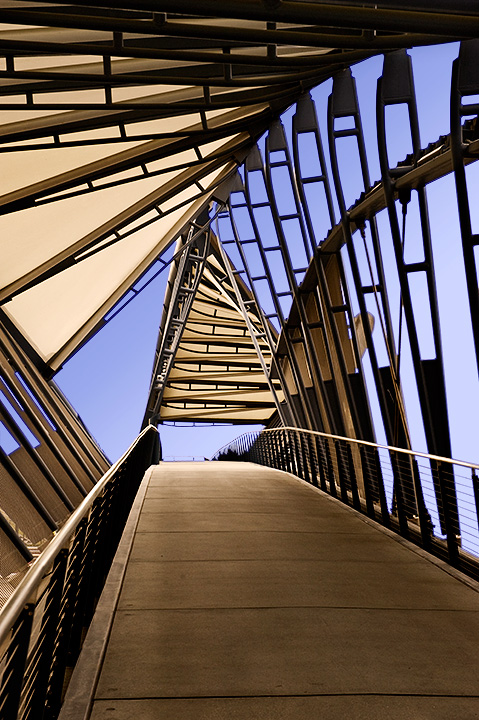
Photographer’s Notes On the Seattle waterfront, there is a pedestrian bridge that crosses about 15 railroad tracks to get to an office building on the other side. This is that bridge. I discovered it a few weeks ago and have been waiting for an excuse to photograph it. The Free Study was my excuse.
Post Processing Editing this took me about 8 hours in Photoshop CS3. By far the longest step was to select the sky, after which my PC crashed and I lost my selection, whereupon I did it again and saved the selection. The rest took me about 10 minutes (except that I did the 10 minute part about 8 times to get the colors right. The two steps that seemed to make the best improvement were: 1) Create a master layer from the first 3, duplicate it and blend in Soft Light to make the image pop a bit more; and 2) Apply a warming filter to the not-sky parts
• Convert from RAW
• Select & Lighten Sky (Curves Layer)
• Add Some Blue to the Sky (Gradient Fill Layer)
• Copy All Layers to a Master Layer
• Duplicate Master (Blending Mode Soft Light)
• Dodge & Burn Bridge Deck (Overlay Layer)
• Select Not-Sky and Warm (Warming Filter layer)
• Resize (Bicubic Sharper)
• Select Sky and Adjust Blues (Hue/Sat Layer)
• Save for Web
My editing is being influenced at the moment by a book titled Welcome to Oz by Vincent Versace. Difficult, but recommended.
Camera Data • Camera: Nikon D3
• Lens: 24-70 mm @ 70
• Date: 2008-02-11 2:22 PM
• Location: Seattle Washington USA
• ISO: 250
• Aperture: f/9
• Shutter: 1/125
Statistics
Place: 57 out of 458 Avg (all users): 6.3836 Avg (commenters): 7.1667 Avg (participants): 6.3874 Avg (non-participants): 6.3750 Views since voting: 1457 Views during voting: 254 Votes: 159 Comments: 8 Favorites: 1 (view)
Very interesting and striking architecture! While it looks good as you have it here, I can't help but think it would be even more striking in B&W (but then I'm a B&W person at heart.)





 Add photograph to your favorites
 Add photographer to your favorites

 Photographer found comment helpful.


