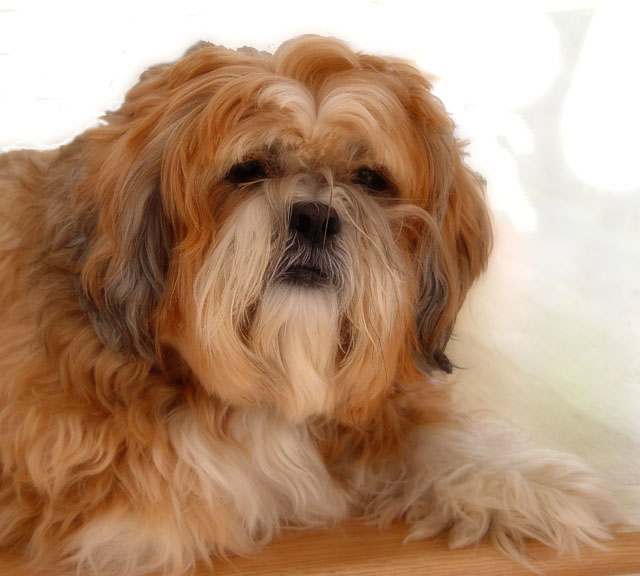
Composition - Well positioned, background is distracting. But if you didn't know what were you supposed to do (rebalence your monitor :| ). Would table(?) fits perfectly with the color of the dog.
Technical Quality - Lighting is even, looks a tiny bit harsh on the back of its neck (hardly noticible). I like the slightly blurry/dreamy look. I also think the eyes could be brightened a bit. But I don't know how much this would effect the idea of your title.
Overall - Nice shot, knocked down from a few technical asspects, but does a good job capturing the emotion of the dog.
Sorry but I see it Everyday. I didn't mark off for it during the challenge. It looks like a shadow/fold in the drape to me and not overly distracting to the shot.
How many people see streaks on the right hand side in the background area? On my monitor, I don't see a thing. On my parents monitor, I see huge streaks!
I really like this dog portrait. I feel like getting on the ground and giving the little guy a pet. It's a beautiful subject, but it's enhanced by the lighting and composition. Good luck!
Hrm, it looks like you have 'painted' some of the background but have missed several areas. It also makes the hair on the top of the dog to be quite flat and not the usual wispy. Painting around hair can be VERY difficult, I know, I've tried it many times. The lighting on the dog is good and even, good color in the fur, and nice texture too. The title suggests the dog may be blind so that makes it more difficult, but the eyes are often an essential part of a portrait to show emotion and 'contact' with the viewer.
this is nicely done...the composition is nice and the color is great...the variance in the color of the background on the right side is a major distraction though
Well, this starts off as a good portrait capture but it ends up with a dog in it . . . no serioiusly I hope you read past that after that big blowup that went on before the contest began. The technical problems I see here are that the eyes are so dark we get almost no catchlights in them and there is a distracting object on the right of the photo. Believe it or not both of these things are fixable so that makes them a real pain. If you have PS you can use the Polygon tool to select around one eye and then hold the shift key and select around the other eye. Now on the layers menu you choose the button that looks like a circle with a diagonal line through it and add a Curves layer based on this selection. You can now lighten just the eyes to bring out more definition and show off some of those eyes that will make this a more personal shot to any viewer and not just someone that knows the pretty pooch. Also with the object on photo right, you can simply clone it out and if you notice a gradiation flowing down your image use the Healing Brush rather than the Clone Stamp to gradually remove the offending outline. I do like the overall dreamy quality you got.
What a wonderful shot! A 10! The color, the crop, the setting, all perfect! Sadly, other's will probably vote you down because it's not a person but to me they are like our children and deserve the same respect as our children. Good job!





 Add photograph to your favorites
 Add photographer to your favorites

 Photographer found comment helpful.


