Camera:Fujifilm FinePix S602Z Location: Basement den (a.k.a. my studio) Date: Feb 2, 2004 Aperture: f10 ISO: 160 Shutter: 2 sec Galleries:Humorous, Studio Date Uploaded: Mar 4, 2004
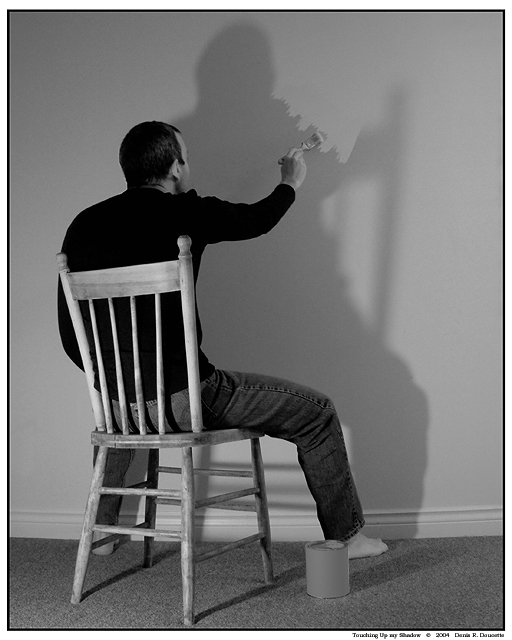
OK. I was playing with a few ideas when this struck me like a bolt out of the blue.
A tabletop lamp sitting on the floor with lampshade removed created the shadow using a 40-watt bulb. Switched white balance on camera to incandescent light. I blocked the light from directly illuminating the camera with a toolbox. I also used a much weaker secondary light source coming from an opening in the wall to the right. This created secondary shadows from my right arm and brush that I had to clone out. I also cloned out an ugly electrical socket as well as imperfections in the wall and on the chair.
I covered the can of white paint with two layers of basic white paper then removed the lid. I used the Pen tool to do the outline of the can and created a new layer. I messed up near the end and didn’t have enough time to do it over again, so the can’s colour isn’t quite right and it looks a little fake.
I used the Spatter brush of the Clone Stamp tool to create the brushstrokes. I think I used 18 and 24 pixel sizes. After having selected my cloning sample on a non-shadowed section of the wall, I created the brushstrokes by clicking the Stamp Tool, holding the mouse button down and dragging away from the shadow (towards the upper right corner). This created the impression of brush strokes.
I tweaked brightness/contrast and adjusted levels just a twinge and colour-corrected slightly. I resized, created the border, resized again and did one sharpen.
Voilà!
I know some will complain by saying this borders on digital art, BUT I didn’t paint anything in… I just used the Clone Stamp in a legal and creative manner.




 Add photograph to your favorites
 Add photographer to your favorites