This is my first attempt to use Layers in Photoshop Elements, so I will be pleased with any score over 5.0.
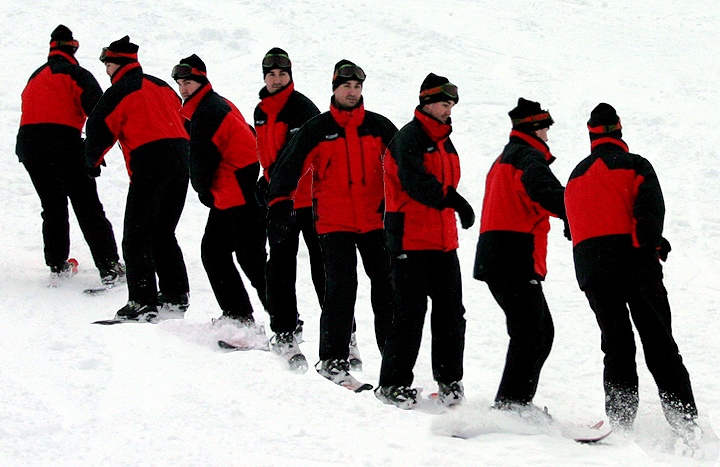
This is my son on a pair of K2 90cm "Fatty" skis. Prefocused, and took with continuous shutter allowing subject to cross image field without moving camera. Camera was hand-held, and I was pretty far away, so his face is not very sharp. 8 fine JPG pics is all the 10D will take before slowing down to about 1 pic per second.
With PS Elements 2, opened 8 pics, then crop and auto-level each one. First shot is background layer. Used Magnetic Lasso Tool to select skier from other pics and added new layer via copy to 1st pic without moving images. Took several attempts to select skiier without getting surrounding snow.
After getting the layers to play well together, used Flatten Image to merge into one. Resized, adjusted lighting with Fill Flash, sharpened, and used clone stamp tool to get rid of a some white specs where the layers overlapped. Saved as JPG.
I tried to play with contrast and backlighting adjustment to get snow shadows to be more pronounced, but it had too much negative affect on the subject. Good learning experience, will do better next time...
Statistics
Place: 65 out of 84 Avg (all users): 5.2484 Avg (commenters): 5.2353 Avg (participants): 5.1667 Avg (non-participants): 5.2683 Views since voting: 953 Views during voting: 739 Votes: 306 Comments: 18 Favorites: 0
Have to say it's another shot that suffers from too much of a good thing. Rather than conveying a sense of motion over time, this just looks like a crowd of guys in red jackets jostling each other around.
Those look like the skis of death. I don't know how people ride those without falling all over the place. To do a 360 as well is nuts. Nice image, the blending gets a little muddy around some of the guys, but that is ok. Overall a 6.
Fun. Kind of looks like a chaotic ski team exercise. I like the diagonal line of the skier. With the exception of a few white outlines around the center figures, this is a good job of combining the images.
I like the idea, but it isn't executed effectively. I'm seeing a thin line of white pixels where the images overlap - my guess is the erase tool didn't get as close as it needed to with several layers...





 Add photograph to your favorites
 Add photographer to your favorites


 Photographer found comment helpful.


