IMG_1357.CR2
Open raw file into Photomatix and use settings:
Strength = 100
Color Saturation = 51
Light Smoothing = High
White Point = 0
Black Point = 0
Gamma = 0.76
Temperature = 3
Saturation Highlights = 5
Saturation Shadows = 5
Microcontrast = 10
Micro-smoothing = 2
Highlights Smoothing = 0
Shadows Smoothing = 0
Shadows Clipping = 0
Method = Details Enhancer
Output depth = 16-bit
Open in CS3:
Heal lens flare at bottom centre.
Neat Image at Default settings.
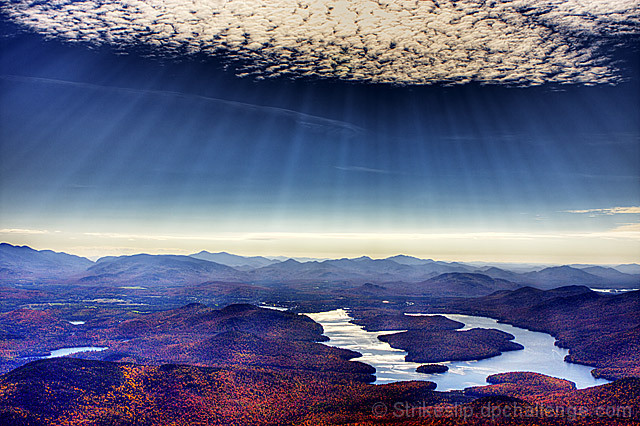
Dodge & Burn to bring out sunbeams & mountains.
Levels = 31, 1.14, 225.
Curves = medium "S" shape.
Flatten layers.
Levels = slide blacks over to about 20.
Flatten layers.
Resize to 640 pixels.
Smart Sharpen 100%.
Save for Web.
Statistics
Place: 188 out of 521 Avg (all users): 5.8824 Avg (commenters): 7.7778 Avg (participants): 5.8854 Avg (non-participants): 5.8696 Views since voting: 935 Views during voting: 196 Votes: 119 Comments: 11 Favorites: 1 (view)
8 - Wow. Love the rays. Nice clouds, nice deep color in the sky. Like the shadows on the land. Nice composition (although maybe a fraction more clouds, but difficult and minor). The russet color of the flora, I'm guessing is natural and not pp induced. Such a shame to view this image at this restricted size. Looks slightly tilted, but could just be the landscape and or perspective.
I love the rays coming from that cloud. However, I'm not sure what you did here but the tones and colors look strange. It ruins it for me. Was this tonemapped?





 Add photograph to your favorites
 Add photographer to your favorites

 Photographer found comment helpful.


