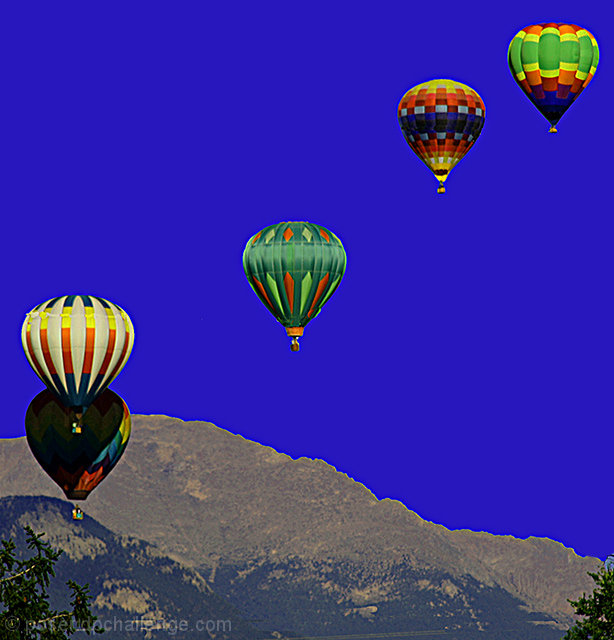
I bet this was something quite beautiful to see. The sky is too saturated - there's this funky bright border between the mountain ridge and the sky. Also there's a halo around some of the balloons. (5)
Was the sky really that bad in the original? Your blue fill doesn't match the rest of the image and the mask lin is very clear on top of the mountains. It is such a good capture of the ballons, too bad you chose a fill methon instead of a different filter for the sky.
I really like the composition however there is a halo around the balloons and the mountain perhaps from over saturation and lightening of the mountain. The colours are beautiful but perhaps to flat. Very nice idea though.
Interesting concept, but absolutely horrible job of replacing the sky. The bad job around all of the balloon edges makes me wonder if this is a composite, or just an attempt to put in a blue sky.
To me it looks like you selected the sky and made it bluer and darker. You should have been more careful in the selection, there is a light halo around the mountains. The sky it SO saturated that it looks cartoonish and takes away from the image. 4
Eeee-gads. Why couldn't you have left the sky alone...!? I'd bet the original image would have done really well, but the fake blue sky is terribly distracting here.
Nicely composed image. But the sky looks too unnatural. Doesn't match the light of the mountainside. If you need help editing this shot, please don't hesitate to PM me after voting is final :)
This would have been a lovely shot were it not for the completely overdone post-processing. The blue sky is dreadful and has created a halo effect around the balloons.
The blue sky is just way too fake. First, given the lack of color in the mountains, you'd expect the sky to similarly lack color, an instead it's an intense blue (a color not normally found in the sky). Second, the color is too uniform. The sky is always a gradient, it is never a single color. This looks like the sky was simply filled in with a single color.
Next time, try something like this:
1) Select the sky using the same method you used here
2) Now duplicate the sky on another layer and set that layer's blend mode to multiply
3) Adjust the opacity of the new layer down to where it looks normal
The above will take the existing colors of the sky and simply intensify them by using the multiply blend mode.
If the sky is completely washed out ... then you could try filling it (like you did here), but instead use a gradient. Pick two colors of blue (one lighter than the other) as your foreground and background colors. Then use the gradient tool to apply the color to your selected area. I would also do this on another layer so that you could then adjust the opacity down to where it looks good.






 Add photograph to your favorites
 Add photographer to your favorites

 Photographer found comment helpful.


