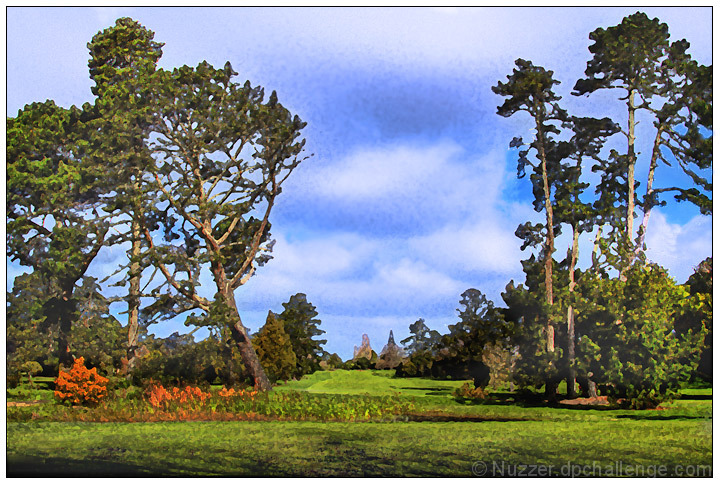
I didn't have anything I liked much this month so thought I'd play with an "average" shot and see if I could do something different with the effects in Photoshop. This is using the Fresco filter that comes standard with Photoshop.
It's the final day of submission and now there's an Impressionism challenge announced. This would fit much better in that but too late now. Hopefully the comments I get in the first days of voting on this will help with my entry for that challenge.
Editing Steps: Open RAW in Photomatix
* HDR
* Tone Map
Fresco Filter
Clone out a few elements
Channel Mixer
* Red: +150, -25, -25
* Green: -25, +150, -25
* Blue: -25, -25, +150
Brightness +13
Contrast -9
Saturation -18
Shadow/Hilight
On the sky
* Photo Filter: Blue, 70%
Levels: 17, 1.00, 255
Selective Colour:
* Reds: Black +100
* Greens: Black +100
Flatten & Resize
USM
Add Border
Save for web
Statistics
Place: 484 out of 503 Avg (all users): 4.4615 Avg (commenters): 4.3750 Avg (participants): 4.3918 Avg (non-participants): 4.6087 Views since voting: 708 Views during voting: 201 Votes: 143 Comments: 9 Favorites: 0
Sorry but don´t dig the filter effect on this shot at all, I want entries that look like photographs and not something made in paintbrush or illustrator. Just wanted to explain why I gave this a 2.
I'm not as fond of the painting style, though I suspect this type of thing would do well in the impressionism challenge. I do like the golf theme, though!





 Add photograph to your favorites
 Add photographer to your favorites


 Photographer found comment helpful.


