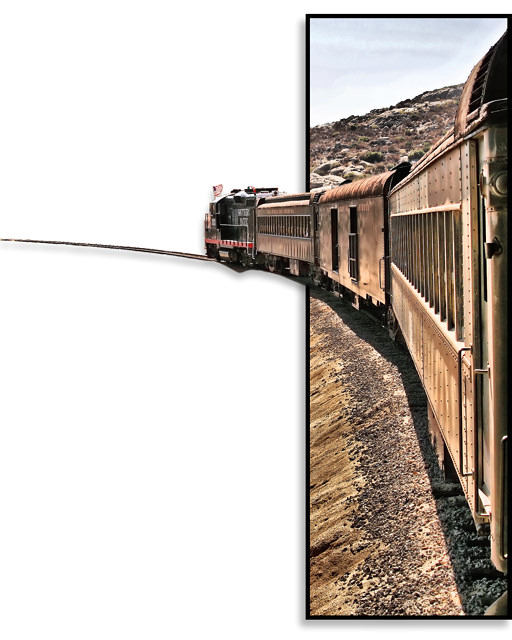
Leaning out the window on the train to Tecate Mexico.
In Corel PSP Photo XI (Lots of Layer Masks on this one)
Process Original: Highpass Sharpen/Clarify/USM
Layer Mask ground above train (no touchy sky) Desat
Duplicate > Layer Mask > Mask the area to be white
Marquee (rectangle) > Train/Track in White area (just inside where border will be) > Promote to Layer.
Layer Mask above layer to remove everything but Train/Tracks.
New Raster Layer between train layer and masked background layer> Rectange Tool (no fill) create border.
Merge border layer with masked background layer and add drop shadow.
Drop Shadow to Train Layer.
Merge Visibe
Final Burn/Dodge
Resize, USM
Statistics
Place: 154 out of 503 Avg (all users): 6.0379 Avg (commenters): 7.3636 Avg (participants): 5.9247 Avg (non-participants): 6.3077 Views since voting: 1240 Views during voting: 242 Votes: 132 Comments: 14 Favorites: 1 (view)
Very strange but interesting. I'm not sure it works for me, but I keep wanting to look at it, so obviously it appeals on the level of wanting to delve deeper into the photo. Certainly creative. You did a good job of keeping some semblance of shadow under the train so it doesn't look completely unnatural.
OK, you took advantage of the "expert editing" rules - but did it enhance your picture in any way? Not imo I'm afraid - you just created yet another example of why I dislike "expert editing".






 Add photograph to your favorites
 Add photographer to your favorites

 Photographer found comment helpful.


