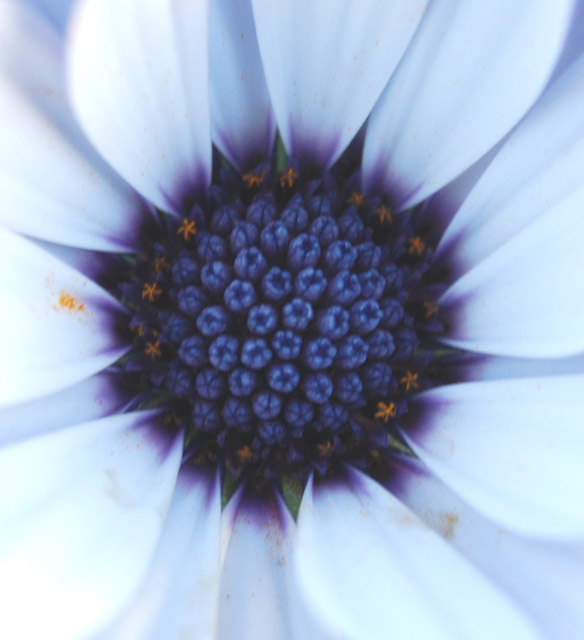
This is my first entry but I think I have everything right with regards to the submission rules. I did edit the original with PS to crop the image and I did boost the contrast and brightness. I do have the orginal on my hard drive.
Statistics
Place: 224 out of 285 Avg (all users): 4.8981 Avg (commenters): 5.2500 Avg (participants): 4.8095 Avg (non-participants): 5.0000 Views since voting: 866 Views during voting: 218 Votes: 157 Comments: 6 Favorites: 0
Rick - A good first effort. Close cropping can work really well with these pretty flowers. A couple of pointers on post processing.
First - make USM (unsharp mask) your friend. This filter is a technique to increase local contrast resulting in sharper and more defined images. Go to Filters - Sharpen - Unsharp Mask to get to it. A good quick rule of thumb is for images for DPC (around 640pixels across) is to use values of ~100-300%, 0.2 radius, and 0.0 threshold. You can play with the sliders to get the look you want but don't overdo it - if you see jagged edges around objects, you have gone too far!
Second - follow the tutorials to learn how to use adjustment layers. These non-pixel containing layers allow you to adjust and readjust the levels, contrast/brightness, hue/saturation, etc over and over again so that you can maximize the editing.
Third - If you are not currently using levels and the histogram, you might this a powerful tool for improving the dynamic range of your photos.
I tried a quick edit of your first entry and noticed that the histogram for the photo seems to be a little off. The image itself seems a bit light and therefore a little lifeless. By using the full range of darks to lights on the histogram, you will maximize the differences between dark and light.
I seem to be straining my eyes to see this shot. The focus must be a little off. I like the composition and the little orange/yellow stars surrounding the center.





 Add photograph to your favorites
 Add photographer to your favorites

 Photographer found comment helpful.


