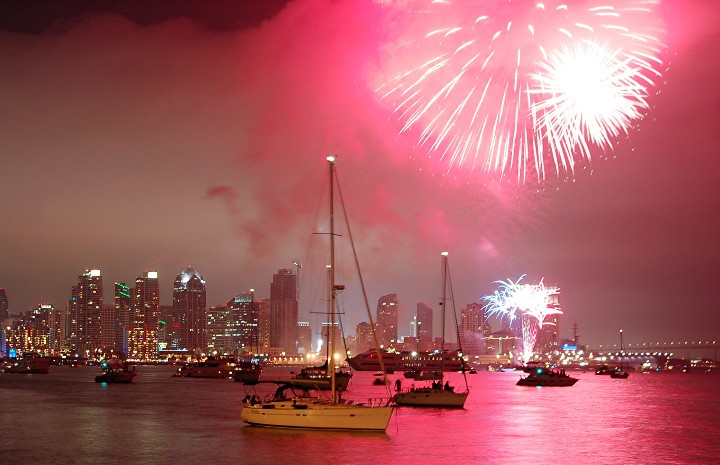
Nikon D50, manual exposure, 4 seconds on tripod, tungsten light setting. Minor sharpen and crop through Microsoft Picture It 9 and 3 spot heals through Photoshop Elements 4.
Statistics
Place: 246 out of 651 Avg (all users): 5.8527 Avg (commenters): 6.5000 Avg (participants): 5.7358 Avg (non-participants): 6.3913 Views since voting: 1705 Views during voting: 192 Votes: 129 Comments: 9 Favorites: 1 (view)
I have to admit, this photo was the first to jump off the screen. Like everyone else I said "ooo pretty pink." (I hate pink, mind you)
1) I cropped out the blacker bit of sky in your top left corner. To me this image is about the pink water. Sure, the firework is pretty, but we've all seen fireworks, and they themselves don't have a "wow" factor. With that in mind, it doesn't hurt to chop a little bit of it out.
2) I used the Sharpen Tool on your foreground boat.
3) I Dodged Highlights and Burned Shadows. I find that this helps sharpen images without actually using any of the sharpening tools. It also helps with fog/haze. I used it to bring out your city a bit. I also used it on the main boat to clear it up.
4) If I could I would move your foremost boat, but I can't, heh. Composition wise, it needs to be at least 1/2 inch to the left.
A lot of impact here. To be nitpicky (per your request) the overhead burst and that nicely lit cityscape seem to be fighting for my attention. Perhaps a different crop would clear up what the subject is and lead the eye better.
This looks like San Diego Bay taken from the middle of Harbor Island (corrected after going there tonight). Nice exposure capturing the fireworks as well as the boats and buildings. The fireworks are a bit washed out, but it's hard to capture this much of a dynamic light range without that happening.






 Add photograph to your favorites
 Add photographer to your favorites

 Photographer found comment helpful.


