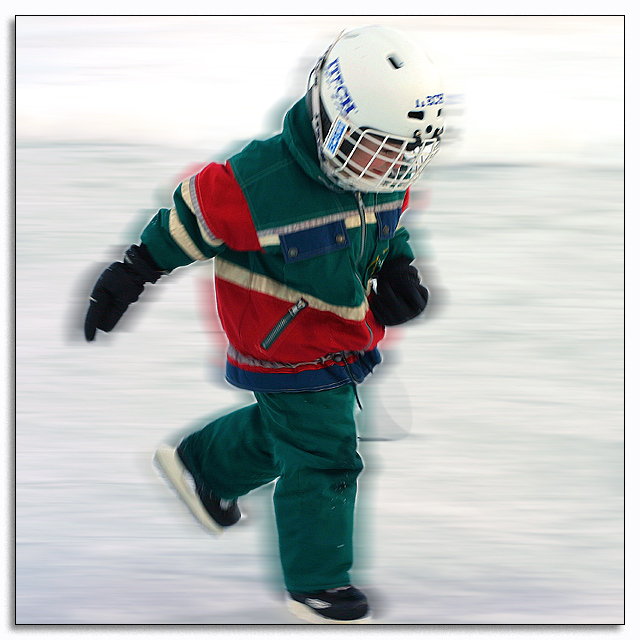
My son Alexander (3 years old) skating on the frozen lake. He is actually skating, but not really moving very fast, so I took advantage of the Extra Rules, so make him go a little faster. Also the picture was a little dull, so I punched it up a bit.
In PS7: Crop, use selection tool to outline Alex, smooth, feather then inverse. Use motion blur to add some speed to his woosh. Some USM on Alex, and also on the whole image as well. Then Saturation layer, except for his face, applied in saturation mode. Resize, border, and save.
It's a kid picture and it's quite out of focus. I predict below 5.0.
Statistics
Place: 42 out of 97 Avg (all users): 5.6792 Avg (commenters): 6.3529 Avg (participants): 5.7121 Avg (non-participants): 5.6559 Views since voting: 1105 Votes: 159 Comments: 17 Favorites: 0
Wow, that is fantastic!! Usually you want the shadow coming from the top left, instead ofthe top right so that's a little wierd, but the rest is AWESOME! Good job. 8.
I'm not a fan of the photoshopped motion blur. I'd recommend sticking to the camera for effects. This ends up looking cheesy and discrediting the shot as a valid photographic effort.
The blur works nicely to give the feeling of motion; the skates don't show any metallic sheen and it took a minute to realize that they weren't just boots. The loss of part of the forward skate was unfortunate.
Way too much digital processing. I don't like the halo around the kid, and the oversharpening white line along the outlines is distracting. Looks fake, I think this would have been a better shot without the PS work, or at least most of it, the original seems to have been a nice shot.
Good feeling of movement. Good exposure time. This is not an easy shot to get such a clear colors against the white backround with a long exposure time.







 Add photograph to your favorites
 Add photographer to your favorites


 Photographer found comment helpful.


