Open image
Dup layer levels
Dup layer dodge
Dup layer use minmaxer to desat and erased out what I didn't want B&W
Flatten down
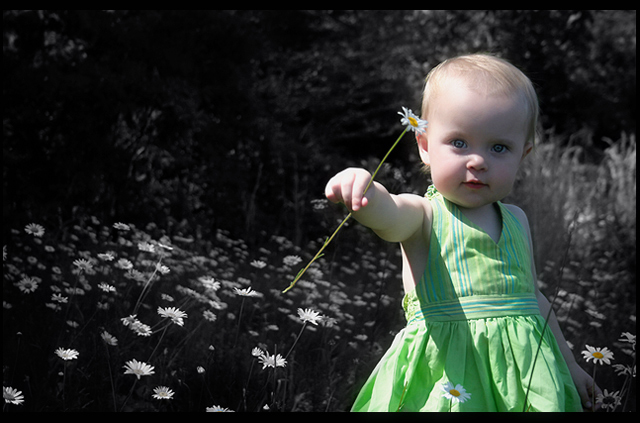
Dup layer sponge tool on flowers and dress
Flatten image
Dup layer channel mixer convert monochrome for more contrast in midtones, blend to multiply, opacity to 25%
Flatten
Dup layer and brightness/contrast eyes
flatten
dup layer and levels eyes
flatten
dup layer brightness/contrast, opacity to 75%
flatten
dup layer burn eyes opacity to 25%
flatten
dup layer and burn around picture, sponge to sat and do lips, opacity to 75%
Flatten
Resize to 800
sharpen
Resize to 640
Neat Image
Add border
Save for web
I went back and used photomatix to add a soft light effect to increase the focus on the baby, bring up the light a little, and give more contrast to the midtones adjusted opacity to 45% and flattened, resave for web :D
I sure hope this does well... she did a lovely job of posing with that daisy :)
Statistics
Place: 86 out of 556 Avg (all users): 5.9145 Avg (commenters): 7.7692 Avg (participants): 5.7416 Avg (non-participants): 6.4643 Views since voting: 1205 Views during voting: 318 Votes: 234 Comments: 15 Favorites: 1 (view)





 Add photograph to your favorites
 Add photographer to your favorites


 Photographer found comment helpful.


