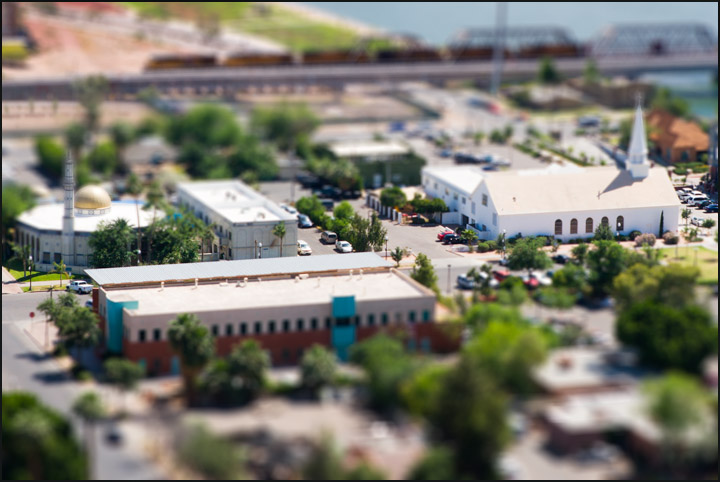
Went hiking and decided to have some fun with the tilt/shift effect using Photoshop. This is a composite image, combining a scene from the heart of old town Tempe, AZ with the capture of a train crossing Tempe Town Lake nearby.
Both shots were taken from essentially the same vantage point atop "A Mountain" just north of ASU campus.
After RAW conversion for each I made duplicate layer in PS, applied Lens Blur for tilt/shift effect using a gradient mask used to selectively feather the out of focus bit from the center of the image out (similar to macro effect on not-so macro shot). I then combined the two images using masks to blend them.
Statistics
Place: 444 out of 573 Avg (all users): 5.1790 Avg (commenters): 6.8000 Avg (participants): 5.0273 Avg (non-participants): 5.5000 Views since voting: 1367 Views during voting: 233 Votes: 162 Comments: 13 Favorites: 0
One thing that might improve this already great image is to bring the church steeple and tower (on left side) back into sharp focus. They are the same distance from the viewer as the buildings in focus, but because they sit higher in the image, were chopped out of focus the horizontal focus band. Great use of the "fake model town" trick!
I want to give this technique a try myself, but haven't yet got around to it. Nicely done - how on earth did you take such a shot and not have captured any people in it? If they're there I haven't spotted them yet, or maybe you cloned them out. :)
Very nicely done. I had the same idea around the middle of the month, but I never got the chance to get to a good location. This is a perfect spot for this effect.
I always find this degauss technique disturbing sometimes. Still well seen picture. Like the fact that you waited for the train. Good contrast. Highly rated.







 Add photograph to your favorites
 Add photographer to your favorites

 Photographer found comment helpful.


