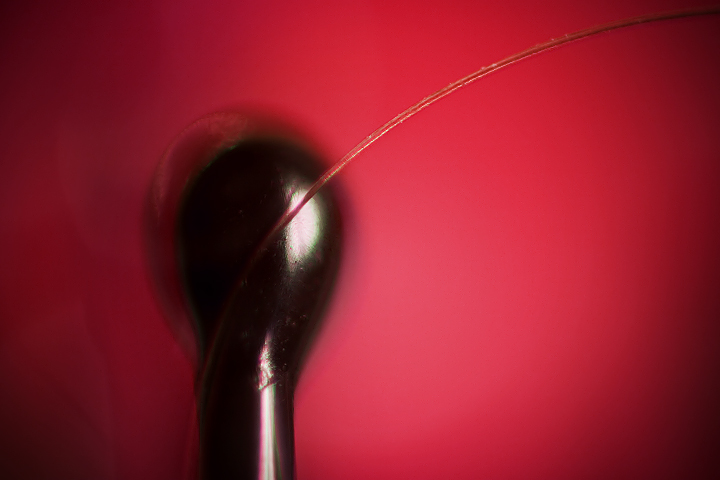
Reverse mounted the 50mm on the 75-300mm. Focal length of 200mm for this shot, thus a decent amount of vignetting. Random overheads lights and a small shop light to the right aimed at the background (red t-shirt). Nothing Expert worthy in the editing this time around.
Shot in RAW: adjusted exposure
PS:
NI
Curves
Hue/Sat
A little burn and clone here and there
Radial gradient in soft light mode to bring out the lighter spot in the middle
Added some more vignetting
Statistics
Place: 126 out of 170 Avg (all users): 5.0476 Avg (commenters): 6.5556 Avg (participants): 4.6667 Avg (non-participants): 5.1765 Views since voting: 787 Views during voting: 398 Votes: 273 Comments: 11 Favorites: 0
Positives: Brave abstract and good choice of red (T-shirt lol!!) for a background. The sharpness of the main subject, the single hair, is very good. Vignette highlights the hair well.
Technicals: This is probably an artifact of post processing but there is banding, most notable on the right side, in the "smooth" background that acts as a distraction. The object holding up the hair looks to be very, very slightly oversharpened in a couple places. Red might be a little oversaturated and the reflection off the 'object' is slightly overexposed.
The Challenge: As is true of most every image, it meets the challenge and does so uniquely with a single hair. It is possible some voters expected hair to be more prominent and may have voted lower because of it. The banding in the red had a negative effect on voting. The 'object' balancing the hair is unidentifiable and though it is a tricky call in an abstract it is possible that voters wanted to know what it is and the fact it is unidentifiable acted as a distraction.
Suggestions: Suggestions to reduce banding. In images captured in RAW do as much color processing and saturation in the RAW converter as possible and open the image in 16-bit mode in a high density color space like "Prophoto RGB". All this will preserve more color variations in color tones and reduce banding. In fact, that is one of the main reasons for taking in RAW in the first place, to preserve all that image detail possible. Color processing in your image editor will degrade your color tones and if you overdo it banding shows up. Don't change image to 8-bit and sRGB until just before you save for the web and your tones will be best preserved in your output file.
Also looks like your cloning may have left some artifacts in the smooth background on the right. The blur and healing tools are good for removing that.





 Add photograph to your favorites
 Add photographer to your favorites

 Photographer found comment helpful.


