these are the processing steps in CS2 ... opened jpeg ...
brightness/contrast adjustment layer
hue/sat adjustment layer and master/desaturated, then selectively erased areas in adjustment layer to create some areas of colour ...
colour balance adjustment layer and created a sort of sepia tone in the desaturated areas which had been a sort of grey colour after desat ..
duplicated background layer and did a filter/artistic/poster edges and opaqued a bit ...
did a lighter vignette and erased everywhere except bottom of image ..
used a flaming pear plug called organic edges that created a bit deeper look to the desaturated areas ...
scaled the image just a tiny bit to give a better proportion and to get rid of the white bit of sky ...
did a kubota border and then did a flaming pear/melancholytron on it and opaqued that effect a whole heap ... cropped ..
resized ...
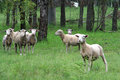
did a noise ninja and erased it from the sheep ..
selectively sharpened the sheep ...
saved for web ..






 Add photograph to your favorites
 Add photographer to your favorites


 Photographer found comment helpful.


