this photo of a shed is taken near concrete works which is about 20km from where i live ..
it'd be great if i could fix a burned out sky easily!!
i didnt really do much to this photo .. honest!! . converted white balance to tungsten in RAW .. then made new layer and selected area of sky above skyline and used gradient tool to create graded darker blue look ... then i had to erase bits of the gradient layer so the yellow flowers showed thru etc..... then i resized and did sharpen ......
this is the original, coz i know some ppl like to see them ...
it is extremely boring!!
nearly deleted this photo, but thought i'd try tungsten which i'm getting hooked on ... i dont think its that boring any more .....
edit ... after this image with title had been in dpc a few hours, i decided to make sure i got terminology right re voyeur ... well i didnt ... i actually meant that this photo gives a feeling of peeping thru secretively .. in the dict voyeurism is more of a sexual thing .... well i gotta say .. there's no sexual thing going on here ..... i'm leaving the title just for the hell of it ......
I really like this, and I'm totally jealous of what you can do with post-processing; I'm still learning (and honestly don't enjoy that as much as "making" the image), but I would have chucked this one! I'm so glad you didn't, it turned out really good!
I think you did a great job on the sky recovery. I cheated and chose a different shot, I worked on my burned out sky for a while and then just plain gave up. Congrats on sticking with it.
The great thing about Photoshop is there are always 100 an 1 ways to do something. Some other things you could have tried would be...
Use the burn tool set to Highlights
Select the roof and adjust it via level or curves
Adjust it with variations
Adjust it with shadows/highlights
After you burn it, use the saturation brush
Used Hue and Saturation to adjust both the lightness and the saturation of the roof at the same time.
It sounds like your method worked well though - these are just some alternatives to play around with. I'm sure there are others as well but this should get you started :)
Nice use of the WB to give a very elegant feel to what was originally a bland looking image. Wish I had this king of creative vision and the ability to pull it off!
nice processing although I would like to see the shadows just a tad brighter, and maybe crop just a tad lower but leave the tops of those flowers. I like how the flower stems mimics th lines of the roof. Nice processing :)
wow, you may not have done a whole lot to it but you still did a wonderful job processing this. It has a very magical "Fairy Land" sort of feel to it.
The only thing I'd change is to maybe burn down the roof of the barn a bit, with it so bright and fairly centered it detracts a little from the wonderful leaves.
hey dan ...... i burned the roof barn and it improved the image heaps ..... the thing is, and you may know ... when i burned it, it desaturated as well, so then i had to select that burned area and i did an adj layer/col balance and increased the cyan and blue to match the rest of the pic ... would there be an easier way? ...
i'm putting this question here for any other ppl who want to learn stuff .. and i'm gonna send this to you in a PM in case you never see it here ... thanks .......
wow, you may not have done a whole lot to it but you still did a wonderful job processing this. It has a very magical "Fairy Land" sort of feel to it.
The only thing I'd change is to maybe burn down the roof of the barn a bit, with it so bright and fairly centered it detracts a little from the wonderful leaves.






 Add photograph to your favorites
 Add photographer to your favorites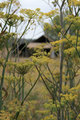


 Photographer found comment helpful.


