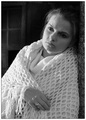
My very first entry. I took this shot of my daughter in natural light at our home. I converted it from RAW, cropped and resized the image and fiddled about with the shadows/hightlights, brightness/contrast levels on Photoshop Elements. Discovered the difficulties of loss of clarity in the image because of resizing (don't know how I overcome that!). I hope it's not a complete disaster.
Statistics
Place: 126 out of 491 Avg (all users): 5.7509 Avg (commenters): 6.8750 Avg (participants): 5.6103 Avg (non-participants): 5.8726 Views since voting: 1540 Views during voting: 394 Votes: 293 Comments: 29 Favorites: 1 (view)
Beautiful portrait!! Great focus and DOF. Natural light makes for some nice portraits. Would like to see a bit wider tonal range in the whites being whiter. Great photograph!
Couldn't help but notice that no one has answered your question in the photo notes.
Resizing a photo always seems to result in a loss of sharpness. I'm no expert, but I'm willing to believe it's due to the sampling process. For example, if you had a section of the image that was:
lots of white... 'white' 'white' 'black' 'black' ... and more black
and you resized your image to 1/4 it's original size, the new, smaller image might consist of something like:
lots of white... 'grey' ... lots of black
That sharp contrast that used to exist between the white and black is now gone.
So, the generally accepted practice on this site (and even allowed in the 'Minimalist' ruleset) is to apply a sharpen filter AFTER you resize the image.
Other than the slight lack of sharpness, this image is amazing! Awesome job on the lighting, composition, and greyscale conversion. Keep up the good work.
Coming back to this photo, I realize it should have placed much higher, I scored it a 7 and the only explanation for that is the dark part at the upper left of the image. The natural light is also my absolute favorite for any portrait and this soft glow is beautiful...
Great first entry into the challenges, all good wishes to you.






 Add photograph to your favorites
 Add photographer to your favorites

 Photographer found comment helpful.


