24 hours is longer than 24 minutes, but even so...
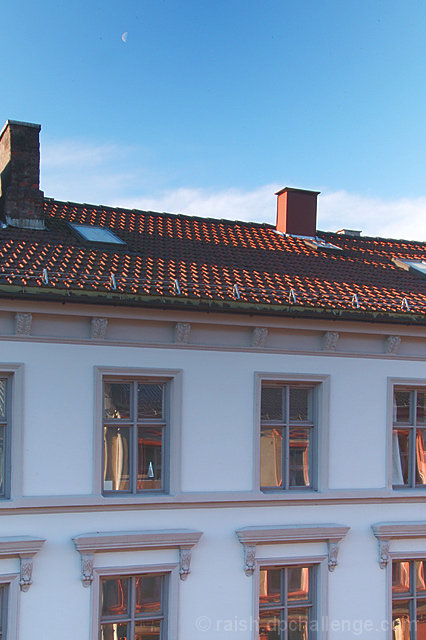
What with it being cold out and me having some sort of cold/flu, here’s the modus operandi for the pic shown:
Look out of window
fetch camera and tripod
check out camera placement angle etc
make manual setting (f/22, 1/13sec)
open window and quickly (so as not to let in too much cold), fire off 5 exposures from 1/5 to 1/30 sec.
Close window.
Transfer pictures to PC
start up Photoshop 7.0
open the 5 pictures
select the darkest
convert to 8 bits
Ctrl-A, Ctrl-C
Open new file
Ctrl-V
I tried a few combinations of exposures 1, 3 and 5, with overlay and/or with one or other layer desaturated and inverted + blurred.
In the end I took the lightest and darkest exposure, cut and pasted into a new document/image/file, made a layer mask for the one on top and drew a line from top to bottom of the picture with gradient fill. This is only of any use when there is a more or less linear progression from dark to light, as was the case here.
Ctrl-Shift-E, then adjustment layers –
There was a wee bit of distortion from the 24mm focal length and the perspective, so I took the opportunity (afforded by working with pasted layers) of straightening that out.
levels (not much to do, just a snip at either end)
resized
hue/saturation (way over the top, as per dpc fashion:))
selected colour (reduced blacks)
USM, at figures of (about) 150, 0.8 and 0.4
Hardly worthy of the term hrd or hdr or whatever, but interesting enough to see how much that shows in the context of the mini-challenge.
Statistics
Place: 69 out of 84 Avg (all users): 4.9164 Avg (commenters): 5.5000 Avg (participants): 4.6047 Avg (non-participants): 4.9713 Views since voting: 1027 Views during voting: 483 Votes: 287 Comments: 8 Favorites: 0
This helps me to understand HDR a little more. Nothing in the view is lost do to shadows and exposures. Good going for a speed challenge when you're feeling lousy!






 Add photograph to your favorites
 Add photographer to your favorites

 Photographer found comment helpful.


