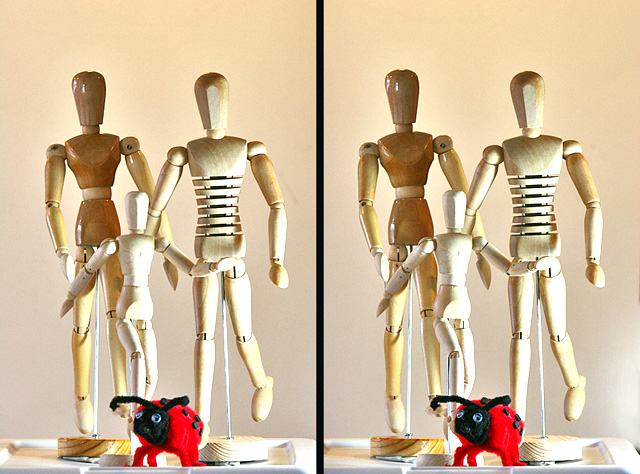
I was inspired by labuda's photo, as seen in this thread, so I just had to try one of my own.
It took many tries, and I could never repeat this, because it was all done by hand with guesswork, no neat measuring gizmo involved.
For those who don't know what they are looking at - this is a 3D stereogram.
You need to look at it cross eyed enough to see a third picture in between the other two, then let your eyes focus on that middle one. If you can manage to do it, the full 3D effect just pops out at you.
It might help to hold a finger tip close to your nose and in front of your screen. Focus on your fingertip, then move your hand away. At that point you should have the third picture there, more or less in focus. Take your time to let your eyes do the rest.
Once I managed to work out the right viewing distance the 3D effect was amazing.
I don't know if it's just my eyes playing silly games, but I see the little guy standing behind the other two, and they have parts of their bodies missing to expose the little one.
Okay, I figured it out. The cross-eyed view versus looking behind the screen. I copied it into photoshop and switched positions of the two images and now I can see it just fine.




 Add photograph to your favorites
 Add photographer to your favorites

 Photographer found comment helpful.


