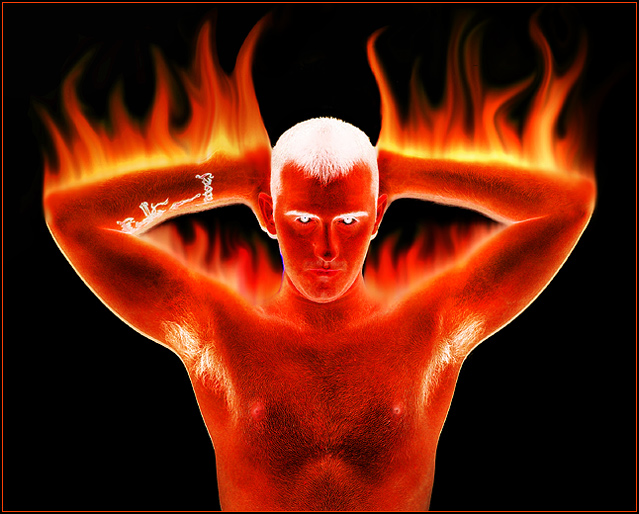
Alrighty then. How did I do this? I will explain and hopefully remember each step.
First, I took a picture of myself with a white background
Next, Invert the picture and then make a duplicate layer of that one.
Next rotate the canvas 90 degrees CW and then run the Filter>Stylize>Wind filter. Make sure it is coming from the left. You will probably have to run that about 2 or 3 more times (hit Ctrl + F). That will give you the streaks that you will be using to turn into the flames. BTW, if there are some streaks that are in places you don't want, just add a mask and paint over those ares with a black brush.
Next, rotate canvas CCW 90 degrees so it is back to normal position. Open a Hue/Saturation adjustment layer and increase the hue and saturation sliders to get the orange/reddish look that looks good to you.
Next,
open the Liquify dialog box under Image>Liquify. This is what took me the longest time. Use the warp tool and shape and move the streaks to look like actual flames. You might adjust the brush pressure and brush size to have more control and more subtle effects in certain areas. You will probably have to use the Reconstruct tool alot when you mess up. Lots of trial and error here.
Next, go to Filter>Render>Lighting Effects and use the pull down menu in that dialog box to choose the 2 o'clock spotlight effect. This is what gives the bright yellow at the base of the flames for more realism. Adjust the settings according to your liking.
Next, I found that I got a much cooler look by flattening the image when I was done and then duplicating the background layer using different blending modes like Multipy or Hard Light. I think I duplicated the layer about 3 times to really get the look I wanted.
That's it! Sorry I dont have any screen shots. If I were doing a how-to tutorial I might, but hopefully this helps anyways. Any questions, just let me know.
Thank you for not assuming we all know how to find every tool in PS, and actually explaining that. I don't know how many times someone has just blithely said "oh, just use so-and-so" and I never DO find it!




 Add photograph to your favorites
 Add photographer to your favorites

 Photographer found comment helpful.


