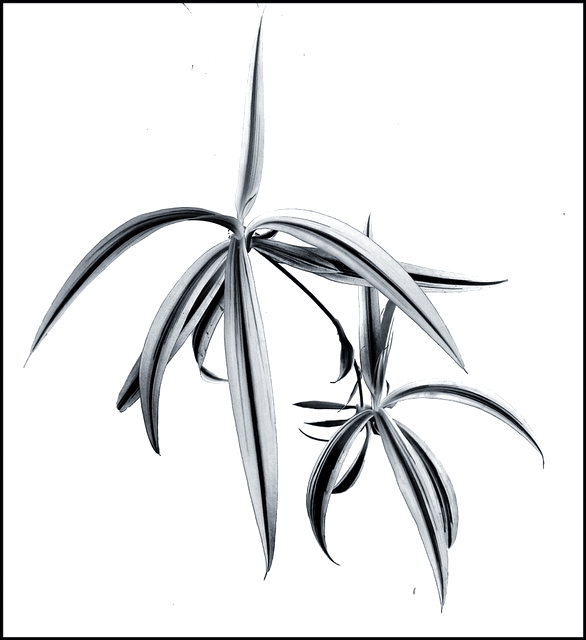
1.Clicked the photo with black background. Wrapped some of the parts of stem with black cloth to give it “floating” feel (wish I could do cloning in basic-editing).
2.Crop
3.Inverted (using curves)
4.Converted to Grayscale
5.Adjusted Levels and Curves
6.Added Border
7.Saved for web
There are some “black” dots visible on photo which was not really prominent before inversion (when they were white). Wish I could use cloning to remove them. I will post the final version, after challenge, with all the “flaws” removed.
Statistics
Place: 44 out of 438 Avg (all users): 5.9481 Avg (commenters): 7.4545 Avg (participants): 5.7674 Avg (non-participants): 6.2289 Views since voting: 1201 Views during voting: 296 Votes: 212 Comments: 14 Favorites: 1 (view)
I agree that the black spots on the photo are annoying. When shooting for a basic editing challenge, you have to take those things into consideration. Regardless of the rules, the image you present has to be at its best. You can't expect the voters to be lenient on an image because the rules did not allow you to finish the image properly. It's unfortunate, but it's true.
This is one of the few high key images with a completely white background I have seen that I actually liked. The photo is a nice study of shape and contrast. Even though it is done in 'negative', I believe it's actually hard to tell that it's negative. I can look at this image and see it either way. I'm not familiar with the inversion process using curves, primarily because I never invert images.
The voters seem to like the image. 5.9 is a good score these days. The only critical comment you received follows along the same idea as in my last paragraph.





 Add photograph to your favorites
 Add photographer to your favorites

 Photographer found comment helpful.


