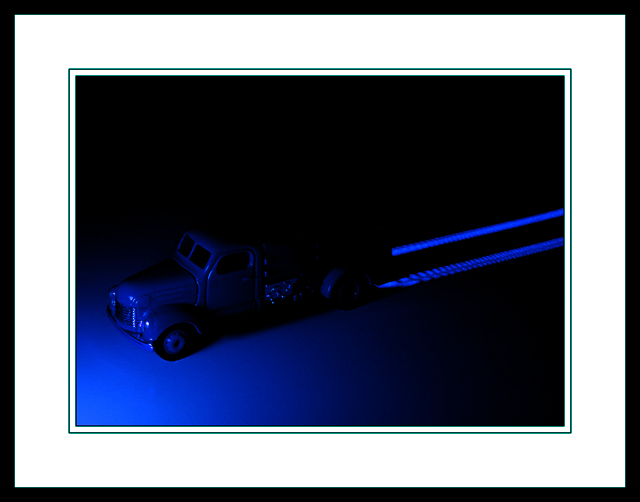
The setup is relatively simple: (1) maglite covered by a white shirt to reduce intensity and soften/diffuse the light; (2) a Laser measure; (3) a toy truck (2.5 inch long); (4) White paper. Placed the truck on the white paper. The maglight was placed in front of the model truck. I set exposure time to 10sec. While the truck was luminated by the maglite, I used the laser measure to draw up two parallel laser lines behind the truck. My original intent was to simulate the rear light trail for a passing car. But the line drawn by the measure was not that perfect, which actually makes more like the tire trails. :) Post processing was simply crop/color hue/level adjust in photoshop.. Thanks.
Statistics
Place: 43 out of 187 Avg (all users): 5.8333 Avg (commenters): 6.7500 Avg (participants): 5.4773 Avg (non-participants): 5.9661 Views since voting: 958 Views during voting: 507 Votes: 324 Comments: 22 Favorites: 2 (view)
CalliopeKel, thanks for the support.. Huh, check out the voting distribution, what a perfect gaussian curve... Now, just need to work on the next project to blue shift it more.. :)
yeah.. I guess the border IS UGLY... it hurts.. Well, this is what makes DPChallenge a great place to learn and grow. Thank everybody for the constructive suggestions
This is pretty cool..the blue is very nice and the tire trails are clever. I wish you would have left the border off of it, though...I think it would have been better without the frame and the photo itself larger, IMHO.
dude, what's with the frame? neat idea... not quite sure that it looks painted with light, maybe if you had used the image limits for detail instead of frame I could see more detail. wee bit too dark.
Border is a little heavy for the site, it reduces the photo even smaller than the already too small 640 px. The composition and blue tone look good, but I would like to be able to see more detail.






 Add photograph to your favorites
 Add photographer to your favorites


 Photographer found comment helpful.


