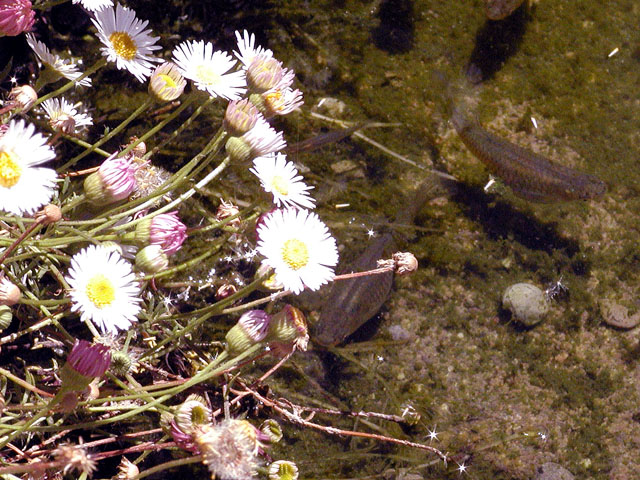
It looks too busy to me with all the flowers. I'd try cropping the right part into a vertical orientation, with just a few flowers on the left forming the border.
A very nice photo except for the blown out daisies. I know it's hard to do within the confines of this contest, but your photo would have been more effective if they wern't so overexposed. If your camera has the adjustments, possibly selecting low contrast and selecting 1/2 stop less would have given you some data in the daisy petals and not underexposed the darker areas too much. Then you coulld have added some contrast in Photoshop or whatever program you're using.
cool, i'm about to get a pond in my garden, so i was interested to see the pond! your title points to the guppies, but if i look at the photo, the flowers are the much more dominant feature in the shot. i'm not sure what you could've done to make the guppies stand out from the background (considering you can't change the colors of the background or the fish), so i can't really give you any tips. maybe zooming in on them so they become more prominant in the shot? -- gr8photos (4)
I was going to ask if you were a guppy OB, but yes, they are pregnant. Nice photo, too bad about the daisies (four are way tooo bright) Photo 7 Transparency 7 total 7 swash
This is tricky. I know what's "wrong" with this shot (= what could be improved to make it a better picture) but I don't know how to fix it. The flowers are the brightest element in this shot (actually over exposed) so the eye naturally goes straight to them - especially as the brightest part is almost dead centre. This detracts attention from the main subject which is comapratively very dark. I suspect the only way round this would have been to wait for the sun to go in and/or use a reflector to boost the rhs. You might try reversing the pciture left to right. Western viewers tend to "read" a photo left to right and stop when they hit the point of interest/brightest bit. However, for some reason, reversing pictures often makes them look "wrong".
Seems a bit over and under exposed. Sorry but the white is fried here. This happens when shooting both bright and dark at the same time. The camera is going to _glom_ onto the the lightest object it finds.






 Add photograph to your favorites
 Add photographer to your favorites


