Due to your high level of liberty I used PhotoShop Elements 4.0 extensively, including crop, Hue/Saturation Enhancement, Warming Filter, Layers, and Color Enhancement on specific items. I learned & stretched & had fun! Thanks!
Statistics
Place: 133 out of 140 Avg (all users): 4.3223 Avg (commenters): 4.7143 Avg (participants): 4.2973 Avg (non-participants): 4.3358 Views since voting: 850 Views during voting: 317 Votes: 211 Comments: 8 Favorites: 0
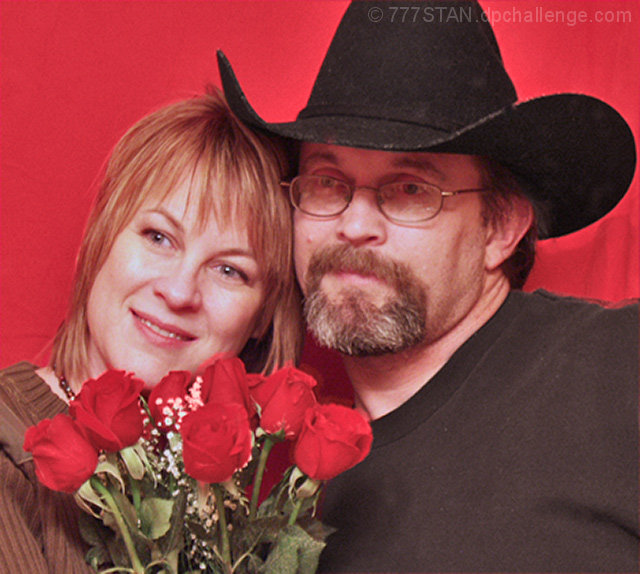
With regard to composition, you did a nice job filling the frame. Unfortunately, the flowers are obscuring a portion of the woman's chin. This image is poorly focused, although I'm sure you'll hear that from others.
Using a reflector would have helped avoid the shadow from the man's hat brim.
I think it would have been better if the people were looking at the camera, as well, but that's just a personal preference.
Lastly, there is a wrinkle in the backdrop that could have been easily cloned out given the unrestricted editing rules.
The woman has a great smile on her face.
Overall, this just has somewhat of a snapshot feel to it.
Few things IMO:
Grainy
Focus could be better
Subjects to close to the background
Light reflecting from the glasses
Flowers a bit to high and to much to the left
The mans shoulder is a bit up like the arm is streching out (taking the pic)
I am not an expert but I will try to comment on this.
All those things are possible to fix. Using NeatImage with the out of focus option would get rid of the grain. Contrast and -brightness could darken the black and give life to her hair. Polarized filter could take the reflected light from the glasses. Stand a bit further from the background and maybe put a reflector (f.x. aluminium paper) to light up your back giving a "further away" effect. Use a tripod to take the picture.
Hope some of this helps.
Aww, what a sweet title. For me, the red background makes the skin tones more red and maybe a different background would have worked better. A nice portrait overall though.





 Add photograph to your favorites
 Add photographer to your favorites


 Photographer found comment helpful.


