| Author | Thread |
Comments Made During the Challenge  |
|
|
07/22/2003 10:55:21 AM |
|
 Photographer found comment helpful. Photographer found comment helpful. |
|
|
07/21/2003 09:54:52 PM |
|
Wonderful colors. Well composed. |
|
| Photographer found comment helpful. |
|
|
07/19/2003 09:54:39 PM |
|
Good subject - image is a bit 'flat" - more interesting lighting would help a lot |
|
| Photographer found comment helpful. |
|
|
07/19/2003 07:52:35 PM |
|
Very neat picture. I like the colors and the subject. The vertical lines seem a bit off to the right. |
|
| Photographer found comment helpful. |
|
|
07/18/2003 11:14:46 PM |
|
Nicely composed, with neat color. Nice job! |
|
| Photographer found comment helpful. |
|
|
07/18/2003 01:56:33 AM |
|
nice photo, fits the challenge well. 8. |
|
| Photographer found comment helpful. |
|
|
07/17/2003 02:58:34 AM |
|
What amazing colors and composition. A perfect 10!! |
|
| Photographer found comment helpful. |
|
|
07/16/2003 11:22:49 PM |
|
This is nice. I particularly like the cropping. |
|
| Photographer found comment helpful. |
|
|
07/16/2003 02:13:49 PM |
|
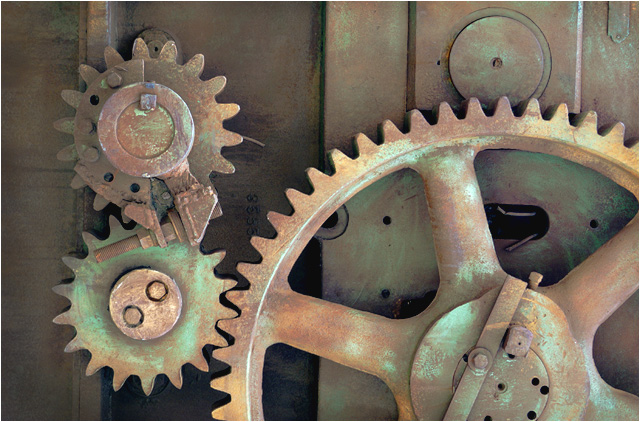
This is cool...you can tell it was taken outside. Good use of natural light and copper tones |
|
| Photographer found comment helpful. |
|
|
07/16/2003 11:39:04 AM |
|
Great light, interesting rust/patina and textures. Good shooting, good entry for the challenge. |
|
| Photographer found comment helpful. |
|
|
07/16/2003 09:51:51 AM |
|
Interesting composition, great subtle colours. 8 |
|
| Photographer found comment helpful. |
|
|
07/16/2003 06:58:07 AM |
|
Nice take on the challenge. |
|
| Photographer found comment helpful. |
|
|
07/16/2003 02:22:42 AM |
|
| Photographer found comment helpful. |
|
|
07/16/2003 12:55:57 AM |
This is so cool! I like industrial shots, but the patina, or old paint, whatever it is really gives this shot some impact. composition is great, as is focus, lighting, DOF. If this were my image, I would try to bump up the contrast a little, either with a contrast adjustment, or a curves adjustment. Another way to increase contrast (not DPC legal, though) in Photoshop is to creat a new layer on top, go to layer>new fill layer> solid color. Change the mode to color burn, then hit OK. A color picker will pop up, select a light gray color and hit OK. Works great!
Congrats on a very nice image and good luck.
JD Anderson |
|
| Photographer found comment helpful. |
|
|
07/16/2003 12:09:18 AM |
|
Beautiful colors and texture ! |
|
| Photographer found comment helpful. |
Theme:
Classic /
Light /
Dark
Home -
Challenges -
Community -
League -
Photos -
Cameras -
Lenses -
Learn -
Help -
Terms of Use -
Privacy -
Top ^
DPChallenge, and website content and design, Copyright © 2001-2026 Challenging Technologies, LLC.
All digital photo copyrights belong to the photographers and may not be used without permission.
Current Server Time: 10/17/2026 05:52:11 AM EDT.






 Add photograph to your favorites
 Add photographer to your favorites


