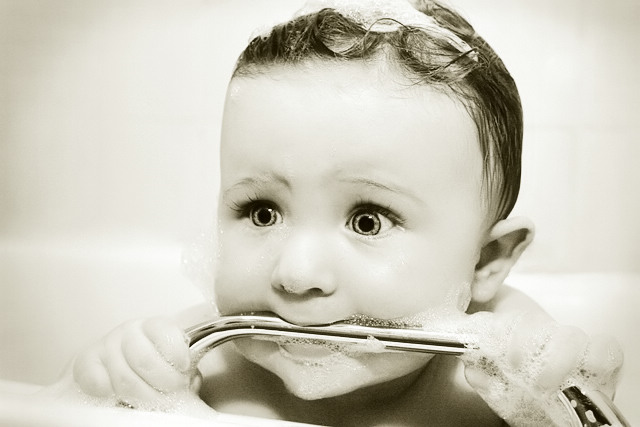
I love PS!! And I love PS'ing other peoples pictures. Especially super cute ones like this! :-)
Brownt's original:
I'll try to remember the process for this best I can...(I'm the worst at remembering how I did this stuff)
other than cropping and cloning out some minor things here's what I did:
1)created a duplicate layer and added a layer mask (KevingRiggs explains this process very well in this thread:
//www.dpchallenge.com/forum.php?action=read&FORUM_THREAD_ID=287883 But instead of just lightening the face I did this to the whole image to brighten it up without losing any detail. Merged layers.
2)Duplicate layer. Magnified the image to 200% and dodged the iris' and whites of the eyes at 4% set on hightlights. Then burned the pupil and around the edge of the iris' at 4% set on shadows. Burned the eyelashes a little also. Merged layers.
3)I then used Pedros Muted action on a duplicate layer, which basically creates a channel mixer in monochrome set at 100% red, 66% green, 100% blue and I moved the constant to around 55%. Then dropped the opacity of that layer down to about 50% or so. Merged Layer
4)Then I greyscaled, changed to quadtoned with Ken Lees bronzed quadtoned which gave it the coloring. I also burned around the edges to create the vignetting. Changed mode from duotone back to RGB color.
5)Lastly I used an unsharp mask action to sharpen it up.
This is all approximate and I'm sure I did some levels and curves adjustments also. But I think that's the meat & potatos of it anyways.
Thanks for all the nice comments, but I just processed it. Little model Ollie had alot to do with the high "Cuteness" factor of it. :-)
i absolutely love this picture. I agree with the other comments, i would have never guessed its from an original color photo. Please share with us how you did this.....i have a few pics of my daughter that i would love to change to this effect.




 Add photograph to your favorites
 Add photographer to your favorites


 Photographer found comment helpful.


