I was reading your description of the image- pre- intra- and post-exposure and was wondering what the "unsharp mask" function does? How does it alter the image? (I also have PSP8.)
Thanks, in advance, for the tip.
Danny
Hi Danny,
Glad you liked it & thanks for your note.
Unsharp mask is a function similar to sharpening. I believe the main differences are (a) the unsharp mask command has 3 separate parameters which can be finely adjusted to get just the right amount of sharpness, whereas the sharpen command has no fine adjustments, and (b) unsharp mask may have less tendancy to accentuate any noise already present.
I'm not exactly sure why it is called "unsharp mask", but I think it is generally to be prefered rather than the sharpen command. It is worth fooling around with to get to know how to use. Paint Shop Pro has a help file which will probably explain the basic adjustments better than I can, but feel free to ask more questions if you like & I'll help all I can (or someone else here surely can).
Paint Shop Pro has a number of "automatic" commands, such as sharpen, auto-contrast, auto-saturation enhance, etc., but as I have gotten deeper into photo editing, I find that I generally prefer the tools which offer more room for fine tuning things to give a more controlled effect.
I was reading your description of the image- pre- intra- and post-exposure and was wondering what the "unsharp mask" function does? How does it alter the image? (I also have PSP8.)
Wow! A blue ribbon after only 5 challenges! And your other entries are very nice, too. I have a feeling we're going to be seeing more ribbons with your name on them!
So come on Paul, don't rip us off. How about a bit of a story about the shot and the process of getting it. Taht's the least you owe the voters :)
OK! OK! I know that its nice to tell all about how about you did your entry. I just didn't really feel like I did anything particularly innovative to get this, but here goes:
It was late Monday afternoon & I still had no really good entry for either open challenge. But lately we've been having some quite pretty sunrises and sunsets. (This time of year is good for this in Northwestern Ontario, partly because of the length of the day. In late June, for instance, to capture a sunrise, one might have to rise at 4:00 or so in the morning, and it's still light at 11:00 PM).
Anyhow, as it got into early evening and it looked as if we could get a nice sunset, I started thinking about how to prepare, just in case. My wife had the car, so I didn't have the option of driving to some "perfect" spot. But we do have a pond on the property with cattails growing. The only problem is, it's down at the base of a hill in a less than optimum spot for capturing sunsets. So I ran down there (by now the sun was setting, and I wasn't yet set up!) found a spot where I could get some cattails without drowning, broke off an armfull of them (carefully chosen for form and character, of course), and ran up the hill to our back field, where the sun was now setting. Realizing that I needed some way to stand them up, I (now getting desperate) sprinted back down to my house to look for something (anything!) to use for a "flower pot". I quickly located a chunk of hollow poplar log from my firewood pile, and hightailed it back up to where my cattails were. After strategically arranging them in their "pot", I set up my camera as low as my tripod will allow and proceeded to capture this "tranquil" scene. (I had to lay on the ground to shoot - and (puff,puff...) boy, did I need the break! The sky that evening really was spectacular, and it was (and always is) great to be there to enjoy it! It didn't take take an awful lot of tweaking on the computer to end up with what you see here. In Paint Shop Pro 8, I used the histogram adjustment for contrast, both for luminance and for colors. Then upped the saturation a little, resized, applied unsharp mask.
And thanks again for all the comments & votes. Hope to learn (and share) lots more in the days to come!
Wow, fifth challenge entered and BANG! Congrats, Paul! I looked at your profile a few days ago and marvelled at how consistently high your first entries scored.
Lovely silhouette against the rich deep colored sky. I like the minimal approach of this shot. It is effective and soothing. That touch of blue at the top of the photo is wonderful.






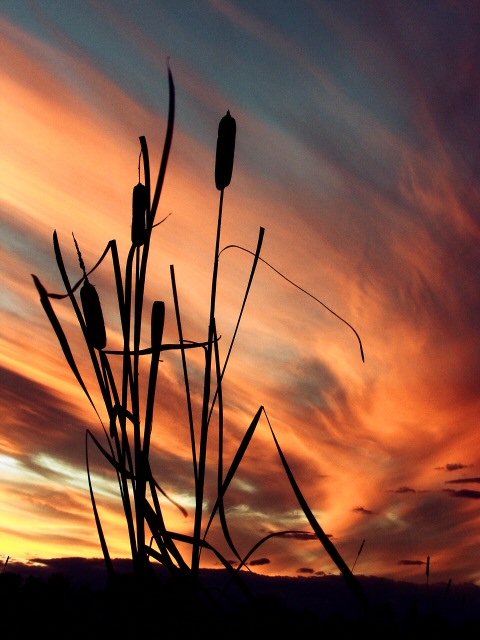
 Autumn Evening
 Add photograph to your favorites
 Add photographer to your favorites

 Photographer found comment helpful.


 to boot Paul!


