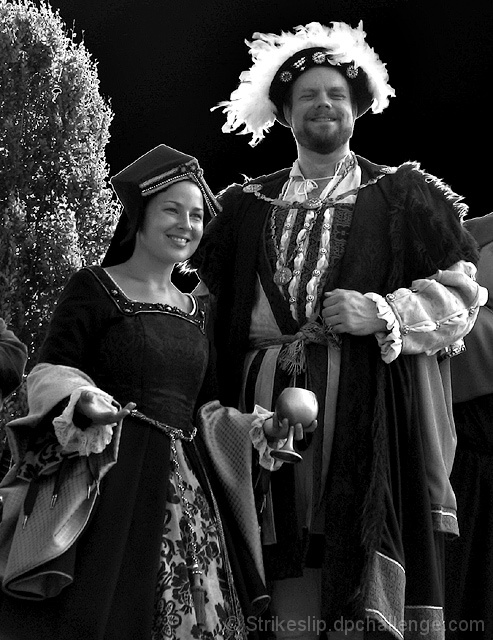
Crop -> Auto colour -> Auto contrast -> Auto levels -> Curves -> Mode = grayscale -> Resize -> USM.
Shot with circular polarizer.
This poor shot got a validation request, probably because I used curves to turn the blown-out, white sky to black. I thought the black sky would be a bit more eye-catching, and lend itself better to the idea. Unfortunately, nothing could save this shot.
:-P
Statistics
Place: 134 out of 232 Avg (all users): 4.8229 Avg (commenters): 4.8571 Avg (participants): 4.9000 Avg (non-participants): 4.7879 Views since voting: 3142 Views during voting: 387 Votes: 288 Comments: 10 Favorites: 1 (view)
i would have scored this higher had you not postprocessed the background as you have done. For the record, i fully believe the manipulation was within the editting rules and am not making you down for "cheating", i just do not like the effect the editting resulted in. I find it to be too harsh and dark for the photo. I expect the sky to be paler than thier rich full coloured robes, but it is the blackest black of the image. A noble man in thie era would pride hiself on the darkest red of his robes, so having the sky manipulated in this way, to me, contridicts his showing of affulence.
Good lighting & tones, but I don't like how the foreground is cut out from the background - it's distracting, especially the bush. I'll be interested to know why you chose to do that.
Ahh, Ren Faire. Great tones. Though, the white borders around the edge of the hats and such - it looks like the background was cut out. Not thrilled with that look.





 Add photograph to your favorites
 Add photographer to your favorites

 Photographer found comment helpful.


