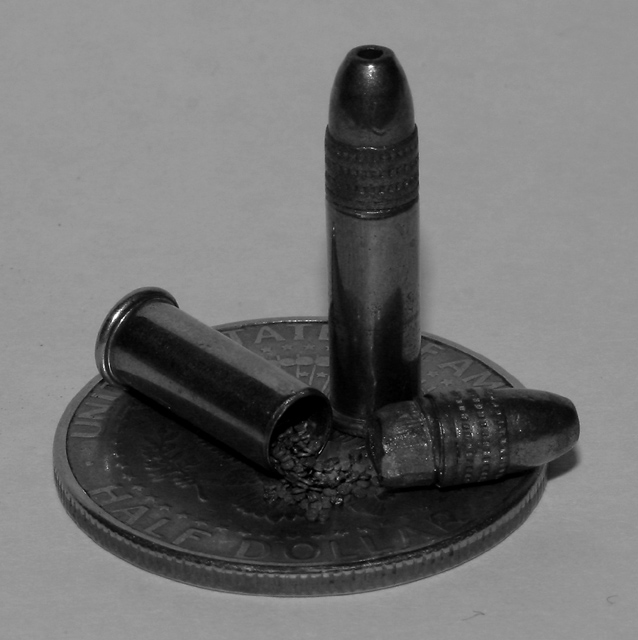
This photo has a good composition and shows promise that some minimal post processing would reveal. Assuming you have Photoshop, I would suggest using levels and/or brightness/contrast to brighten the photo and raise the contrast slightly. You can use the clone stamp to remove the hot pixels (bright spots) and some sensor dust spots which distract. You can use the Sharpen (unsharp mask) filter to sharpen the whole photo slightly. You have desaturated the photo by switching to grayscale color mode. This won't display the same way in your browser as it does in photoshop (looks darker in the browser). I would suggest using Hue/Saturation to desaturate but make sure you leave the photo in RGB color mode for good fidelity with a browser. Finally, I think the copper jackets should be copper colored (my personal taste). You might selectively desaturate to leave them in their original color. I painted them back in because I didn't have your original. I don't want to seem arrogant or hurtful, but if you try these, I think you'll be happy with the results and the improvement in your score. After the challenge, PM me and I'll send you my edited version of your photo.
Good composition! And you've definitely chosen small objects and gotten close up with them. I think I would like this a little better if the background were a brighter color (perhaps blue or red?). I think it might help the metallic hues show up a bit better. Lighting looks pretty good, in that there are no giant glares, but it looks a little bit dark to me. Really like the detail on this..nice and clear.
What a great composition. Good idea to let it sit on a half-dollar to give you the perspective of how tiny your subject is. Great deatil for a macro shot.







 Add photograph to your favorites
 Add photographer to your favorites


 Photographer found comment helpful.


