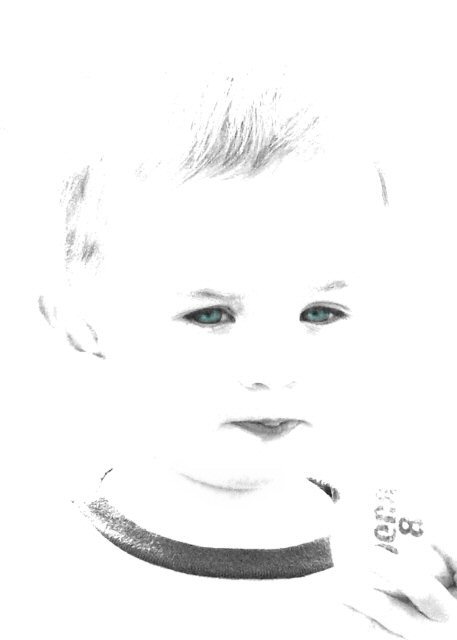
Split channels to desaturate
Adjusted brightness to 78 and contrast to 78
Added color back to eyes
Burned around facial features
Cloned out small distraction by bottom lip and shadowing behind right temple
Softened chin line
Close cropped
Statistics
Place: 249 out of 251 Avg (all users): 4.0553 Avg (commenters): 4.0714 Avg (participants): 3.9174 Avg (non-participants): 4.2018 Views since voting: 782 Views during voting: 402 Votes: 235 Comments: 30 Favorites: 0
I understand the "look" you were going for... but I think you need to adjust the post-processing a little... I think it would have been more successful with more tones, even though you are going for a high key look.
Excellent attempt at high key, I just think that the edges of his face being washed out make it very slightly unsettling. Re-processing to add back in some of the definition of the image might have increased the score.
the extreme white areas seem to take away from the subject but it's good to see people trying different things not enough of us on the road less traveled
I realise you're going for the high-key look here but it mostly comes across as extreme post processing. There is some noise and odd artifacts in the image from the extreme adjustments made. I think being a little less extreme and more subtle may have worked better for me, but if you like the effect you got then that is just as good too.
Having a real hard time with this one.
I'm sure some that really like this sytle of high-key imaging will love it. I don't love it, and don't hate it either - just not my style. (5)
For my taste it is far to light. I'm not sure if you wanted to have it so extremely wihte but it is far too ligt for my taste. But the taste is of course different from one person to another.
This is very cute. I like the framing of it. There's an intensity of the boy's face yet he still looks relaxed and playful. Two adjustments that would be interesting to see are coloured eyes (they already look v. slightly blue) and darker blacks






 Add photograph to your favorites
 Add photographer to your favorites


 Photographer found comment helpful.


