I wanted to play around with the idea of digital as something linked to files and disks, rather than prints or negs.
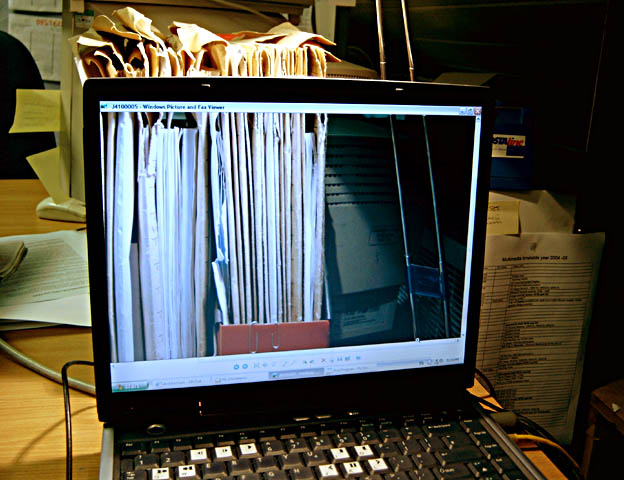
I took an image of the files on my desk, then displayed the shot on the screen. I then photographed the scene, roughly lining up the image, a double-take, and it came out somewhat wierd.
Not sure how innovative it is. Hopefully, might raise a smile on someones face....I don't expect a ribbon!!.
Taken on my Jenoptik ZD4100z3s, a fun camera, but not for serious photography.
Statistics
Place: 56 out of 191 Avg (all users): 5.5409 Avg (commenters): 7.0000 Avg (participants): 5.3804 Avg (non-participants): 5.6000 Views since voting: 1328 Views during voting: 554 Votes: 342 Comments: 17 Favorites: 1 (view)
I really like the concept. Perhaps a fill flash for the right side would have brought up the dead space a little. The keys on the keyboard are at soft focus and the tops of the folders are too bright. Spot metering a neutral area might have given you better settings for your camera.
Really nice idea - I really like it. A few thoughts:
1) The forground could be a crisper, especially on the keyboard.
2) The office jumble adds to this somewhat, but it may be even more effective with just the files and lamp to concentrate on.
3) Some kind of diffuser and a low power bulb on the lamp would lower the highlights on the files and make the laptop screen really glow.
3) Not sure, but it might be more effective to display the picture full screen without any of the Windows bits. If you want to do this, and don't know how, you can open it (as jpg) in an internet explorer window, then hit F11. If you are on XP service pack 2, you might also need to right click on the toolbar at the top and select auto-hide. You may be a computer whiz, so don't feel patronized if you already knew how!!
You have a very creative idea here. It is interesting but not photographically appealing. You obviously gave this some thought. Maybe a different backround and lighting would have taken it to the next level. DPC is a great place to learn how to do this. Keep it up!






 Add photograph to your favorites
 Add photographer to your favorites

 Photographer found comment helpful.


