Photoshop:
Level adjustments
Curve adjustments
USM defog 20-60-0
JPG noise removal
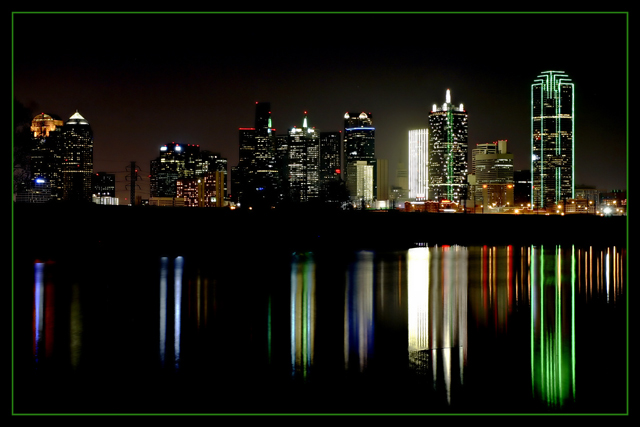
Crop to 7.5" x 11.5"
Added 1/2" border
Saved for web at 148k max
Model - Canon EOS 10D
XResolution - 180
YResolution - 180
DateTime - 2004:12:31 19:34:26
DateTimeOriginal - 2004:12:31 19:34:26
DateTimeDigitized - 2004:12:31 19:34:26
ExposureTime - 15/1 seconds
FNumber - 9.00
ISOSpeedRatings - 100
ComponentsConfiguration - YCbCr
CompressedBitsPerPixel - 3 (bits/pixel)
ShutterSpeedValue - 1/0 seconds
ApertureValue - F 9.00
MaxApertureValue - F 4.50
MeteringMode - Multi-segment
Flash - Not fired
FocalLength - 52 mm
ColorSpace - sRGB
ExifImageWidth - 3072
ExifImageHeight - 2048
SensingMethod - One-chip color area sensor
FileSource - DSC - Digital still camera
CustomRendered - Normal process
ExposureMode - Manual
WhiteBalance - Auto
SceneCaptureType - Standard
Macro mode - Off
Self timer - Off
Quality - Fine
Flash mode - Not fired
Sequence mode - Single or Timer
Focus mode - AI Focus
Image size - Large
Easy shooting mode - Manual
Digital zoom - None
Contrast - Normal
Saturation - Normal
Sharpness - Normal
ISO Value - 100
Metering mode - Evaluative
Focus type - Auto
AF point selected -
Exposure mode - Manual
Focal length - 28 - 90 mm
Flash activity - Not fired
Sequence number - 0
White Balance - Auto
Statistics
Place: 7 out of 135 Avg (all users): 6.6840 Avg (commenters): 7.5714 Avg (participants): 6.1711 Avg (non-participants): 6.9706 Views since voting: 2048 Views during voting: 361 Votes: 212 Comments: 23 Favorites: 4 (view)
...and you should, too. This is a good one. It's kind of annoying that the shore makes the photo feel slightly tilted, but I realize that the shore is not the horizon (which IS straight). As it were, the reflections being straight help to counter that illusion. Good job.
More night shots definitely, but less colored borders! This would look pretty slick without the border, and another suggestion would be to include either more water or more sky, to avoid placing the horizon so close to the middle of the frame.






 Add photograph to your favorites
 Add photographer to your favorites

 Photographer found comment helpful.


