Whoa - not the worst i've seen in this challenge, but you're close...I hope this is your first entry - yo uhave several easy to fix errors:
TOO SMALL. Check the tutorials on this site on how to sizxe a pic for entry - it needs to be about 600-640 pizels on the long side. DPI does not matter, just total pixels. DPI id for printing ONLY.
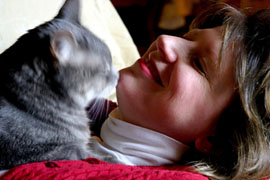
TOO slow a shutter speed - the cat is blurry because he moved. a faster shutter speed would fix this (or tranquilize the cat - just kidding!)
MORE LIGHT - this is how to increase the shutter speed - or go for a larger aperture (small number like 2.8). Try using flash, although that can have issues too in other ways.
COMPOSITION: the placement of hte person and cat is fine, the red bit in the front is what? a barrier to me and the action in the pic and a distraction. It adds nothing. The background is part yellow and part dark - why? I think it is a couch and you tilted the pic or is it a falling blanket taht was your backdrop? It adds some interest, but is also a distraction. Perhaps without the red bit i'd have a better thought on the yellow bit.
Composition: 7
Technical: 4, Too small an image
Appeal: 4, Again, size matters
Challenge: 6, Could've been cooler if human face was blurred, cat in focus
Overall Score: 4, (weighted)
From what I can see there is motion blur on the cat and the shadows are to harsh. You did meet the challenge but your photograph lacked the quality at least from what I can see being so small. Next time use the 640 x size that way we can see more detail. Wish you the best in the challenge.





 Add photograph to your favorites
 Add photographer to your favorites


 Photographer found comment helpful.


