- Created a duplicate layer, applied high pass filter (45px radius), inverted and then set the layer mode to "low light"
- Created an Adjustment Layer for curves (the white point was set to the center of the paper sheet).
- Created an Adjustment Level for Brightness/Contrast (+20, +5)
- Flatten Image
- USM
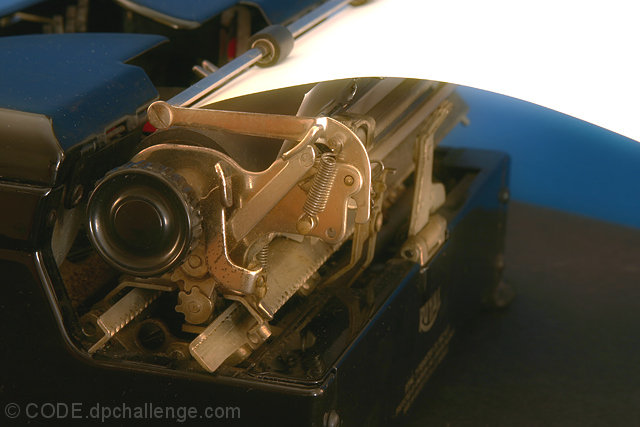
The whole Idea for my Post Processing (besides correcting color) was to give it a "Vintage" look by creating a soft focus and glow, the original image is Here
Statistics
Place: 67 out of 177 Avg (all users): 5.5233 Avg (commenters): 6.5714 Avg (participants): 5.3196 Avg (non-participants): 5.7867 Views since voting: 976 Views during voting: 252 Votes: 172 Comments: 8 Favorites: 0
It certainly looks like a very old, low tech typewriter - surprisingly only the second I've seen in this challenge. This one has superior lighting and setup (i.e. paper inserted), but loses points for not letting me see that which would make this more immediately identifiable - the keys. Even if you felt it important to get the mechanics in the back, a little pan out and / or left seems like it would captured it all. :)
Want to imnprove this pic by 50%? Open it as is in PS and do a USM with settings of Amount 30%, radius 60 and T-Hold of 0. It removes the haze i see in this pic. Much more 'pop' after that.
Seems like you shot the least interesting part of the item. It's a typewriter. I want to see keys or the insde letters. Something that would make this interesting. Good attempt.






 Add photograph to your favorites
 Add photographer to your favorites

 Photographer found comment helpful.


